Web support for Flutter
Details of how Flutter supports the creation of web experiences.
Flutter delivers the same experiences on the web as on mobile.
Building on the portability of Dart, the power of the web platform, the flexibility of the Flutter framework, and the performance of WebAssembly, you can build apps for iOS, Android, and the browser from the same codebase. The web is just another device target for your app.
To get started, visit Building a web application with Flutter.
Powered by WebAssembly
#Dart and Flutter can compile to WebAssembly, a binary instruction format that enables fast apps on all major browsers.
For a glimpse into the benefits of using WebAssembly, check out the following video.
How it works
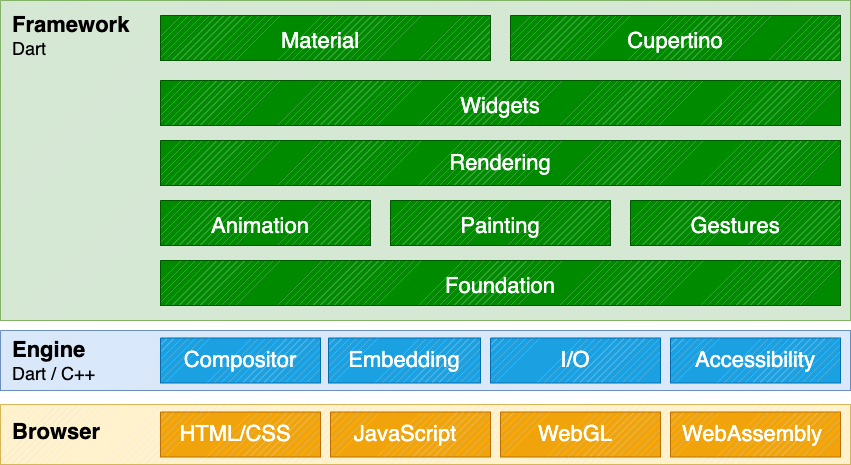
#Adding web support to Flutter involved implementing Flutter's core drawing layer on top of standard browser APIs, in addition to compiling Dart to JavaScript, instead of the ARM machine code that is used for mobile applications. Using a combination of DOM, Canvas, and WebAssembly, Flutter can provide a portable, high-quality, and performant user experience across modern browsers. We implemented the core drawing layer completely in Dart and used Dart's optimized JavaScript compiler to compile the Flutter core and framework along with your application into a single, minified source file that can be deployed to any web server.
What types of apps can I build?
#While you can do a lot on the web, Flutter's web support is most valuable in the following scenarios:
- Single Page Application
-
Flutter's web support enables complex standalone web apps that are rich with graphics and interactive content to reach end users on a wide variety of devices.
- Existing mobile applications
-
Web support for Flutter provides a browser-based delivery model for existing Flutter mobile apps.
Not every HTML scenario is ideally suited for Flutter at this time. For example, text-rich, flow-based, static content such as blog articles benefit from the document-centric model that the web is built around, rather than the app-centric services that a UI framework like Flutter can deliver. However, you can use Flutter to embed interactive experiences into these websites.
However, if you want to use Dart and wish to implement a traditional DOM-based website, a community-released Dart package, Jaspr, supports static websites; in fact, the Dart documentation and Flutter documentation and marketing websites were migrated to use the Jaspr package. Note that Jaspr uses Dart (but not Flutter), and makes SEO work in the same way a traditional website would.
Get started
#The following resources can help you get started:
- To add web support to an existing app, or to create a new app that includes web support, visit Building a web application with Flutter.
- To configure web development server settings in a centralized file, check out Set up a web development configuration file.
- To learn how to create a responsive Flutter app, check out Creating responsive apps.
- To view commonly asked questions and answers, visit the web FAQ.
- For code examples, check out the web samples for Flutter.
- For a Flutter web app demo, check out the Wonderous app.
- To learn about deploying a web app, visit Preparing an app for web release.
- File an issue on the main Flutter repo.
- You can chat and ask web-related questions on the #help channel on Discord.
Unless stated otherwise, the documentation on this site reflects Flutter 3.47. Page last updated on 2026-07-23. View source or report an issue.