# Flutter fix
> Keep your code up to date with the help of the Flutter Fix feature.
As Flutter continues to evolve, we provide a tool to help you clean up
deprecated APIs from your codebase. The tool ships as part of Flutter, and
suggests changes that you might want to make to your code. The tool is available
from the command line, and is also integrated into the IDE plugins for Android
Studio and Visual Studio Code.
:::tip
These automated updates are called _quick-fixes_ in IntelliJ and Android
Studio, and _code actions_ in VS Code.
:::
## Applying individual fixes
You can use any supported IDE
to apply a single fix at a time.
### IntelliJ and Android Studio
When the analyzer detects a deprecated API,
a light bulb appears on that line of code.
Clicking the light bulb displays the suggested fix
that updates that code to the new API.
Clicking the suggested fix performs the update.
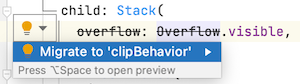
A sample quick-fix in IntelliJ
### VS Code
When the analyzer detects a deprecated API,
it presents an error.
You can do any of the following:
* Hover over the error and then click the
**Quick Fix** link.
This presents a filtered list showing
_only_ fixes.
* Put the caret in the code with the error and click
the light bulb icon that appears.
This shows a list of all actions, including
refactors.
* Put the caret in the code with the error and
press the shortcut
(**Command+.** on macOS, **Control+.** elsewhere)
This shows a list of all actions, including
refactors.
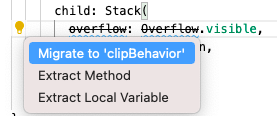
A sample code action in VS Code
## Applying project-wide fixes
[dart fix Decoding Flutter][]
To see or apply changes to an entire project,
you can use the command-line tool, [`dart fix`][].
This tool has two options:
* To see a full list of available changes, run
the following command:
```console
$ dart fix --dry-run
```
* To apply all changes in bulk, run the
following command:
```console
$ dart fix --apply
```
For more information on Flutter deprecations, see
[Deprecation lifetime in Flutter][], a free article
on Flutter's Medium publication.
[Deprecation lifetime in Flutter]: https://blog.flutter.dev/deprecation-lifetime-in-flutter-e4d76ee738ad
[`dart fix`]: https://dart.dev/tools/dart-fix
[dart fix Decoding Flutter]: https://www.youtube.com/watch?v=OBIuSrg_Quo