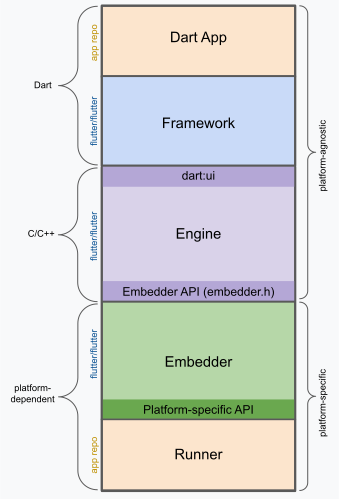
 **Dart App**
* Composes widgets into the desired UI.
* Implements business logic.
* Owned by app developer.
**Framework** ([source code](https://github.com/flutter/flutter/tree/main/packages/flutter/lib))
* Provides higher-level API to build high-quality apps
(for example, widgets, hit-testing, gesture detection,
accessibility, text input).
* Composites the app's widget tree into a scene.
**Engine** ([source code](https://github.com/flutter/flutter/tree/main/engine/src/flutter/shell/common))
* Responsible for rasterizing composited scenes.
* Provides low-level implementation of Flutter's core APIs
(for example, graphics, text layout, Dart runtime).
* Exposes its functionality to the framework using the **dart:ui API**.
* Integrates with a specific platform using the Engine's **Embedder API**.
**Embedder** ([source code](https://github.com/flutter/flutter/tree/main/engine/src/flutter/shell/platform))
* Coordinates with the underlying operating system
for access to services like rendering surfaces,
accessibility, and input.
* Manages the event loop.
* Exposes **platform-specific API** to integrate the Embedder into apps.
**Runner**
* Composes the pieces exposed by the platform-specific
API of the Embedder into an app package runnable on the target platform.
* Part of app template generated by `flutter create`,
owned by app developer.
## Reactive user interfaces
On the surface, Flutter is [a reactive, declarative UI framework][faq],
in which the developer provides a mapping from application state to interface
state, and the framework takes on the task of updating the interface at runtime
when the application state changes. This model is inspired by
[work that came from Facebook for their own React framework][fb],
which includes a rethinking of many traditional design principles.
[faq]: /resources/faq#what-programming-paradigm-does-flutters-framework-use
[fb]: https://www.youtube.com/watch?time_continue=2&v=x7cQ3mrcKaY&feature=emb_logo
In most traditional UI frameworks, the user interface's initial state is
described once and then separately updated by user code at runtime, in response
to events. One challenge of this approach is that, as the application grows in
complexity, the developer needs to be aware of how state changes cascade
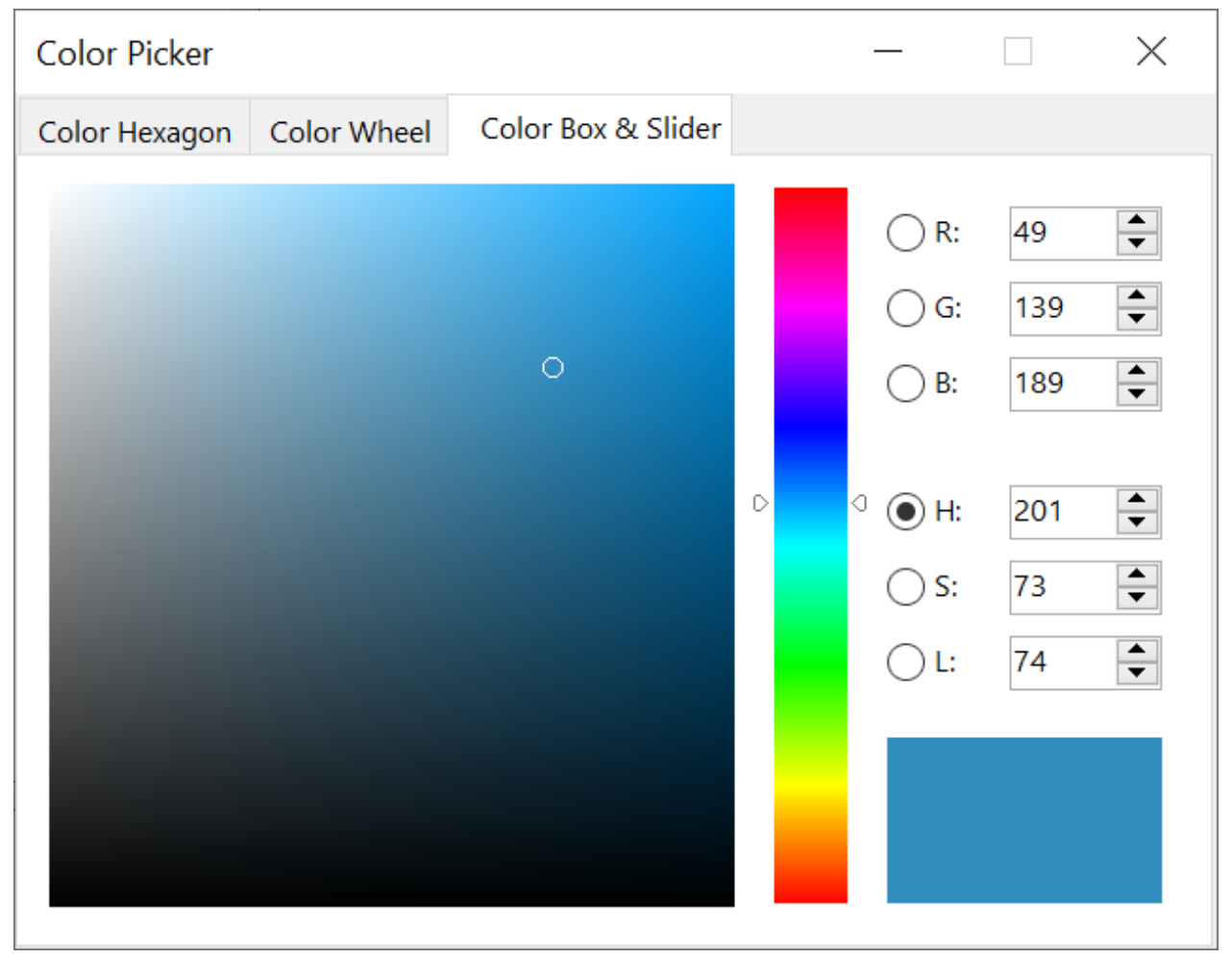
throughout the entire UI. For example, consider the following UI:
{:width="66%"}
There are many places where the state can be changed: the color box, the hue
slider, the radio buttons. As the user interacts with the UI, changes must be
reflected in every other place. Worse, unless care is taken, a minor change to
one part of the user interface can cause ripple effects to seemingly unrelated
pieces of code.
One solution to this is an approach like MVC, where you push data changes to the
model through the controller, and then the model pushes the new state to the view
through the controller. However, this also is problematic, since creating and
updating UI elements are two separate steps that can easily get out of sync.
Flutter, along with other reactive frameworks, takes an alternative approach to
this problem, by explicitly decoupling the user interface from its underlying
state. With React-style APIs, you only create the UI description, and the
framework takes care of using that one configuration to both create and/or
update the user interface as appropriate.
In Flutter, widgets (akin to components in React) are represented by immutable
classes that are used to configure a tree of objects. These widgets are used to
manage a separate tree of objects for layout, which is then used to manage a
separate tree of objects for compositing. Flutter is, at its core, a series of
mechanisms for efficiently walking the modified parts of trees, converting trees
of objects into lower-level trees of objects, and propagating changes across
these trees.
A widget declares its user interface by overriding the `build()` method, which
is a function that converts state to UI:
```plaintext
UI = f(state)
```
The `build()` method is by design fast to execute and should be free of side
effects, allowing it to be called by the framework whenever needed (potentially
as often as once per rendered frame).
This approach relies on certain characteristics of a language runtime (in
particular, fast object instantiation and deletion). Fortunately, [Dart is
particularly well suited for this
task](https://blog.flutter.dev/flutter-dont-fear-the-garbage-collector-d69b3ff1ca30).
## Widgets
As mentioned, Flutter emphasizes widgets as a unit of composition. Widgets are
the building blocks of a Flutter app's user interface, and each widget is an
immutable declaration of part of the user interface.
Widgets form a hierarchy based on composition. Each widget nests inside its
parent and can receive context from the parent. This structure carries all the
way up to the root widget (the container that hosts the Flutter app, typically
`MaterialApp` or `CupertinoApp`), as this trivial example shows:
```dart
import 'package:flutter/material.dart';
import 'package:flutter/services.dart';
void main() => runApp(const MyApp());
class MyApp extends StatelessWidget {
const MyApp({super.key});
@override
Widget build(BuildContext context) {
return MaterialApp(
home: Scaffold(
appBar: AppBar(title: const Text('My Home Page')),
body: Center(
child: Builder(
builder: (context) {
return Column(
children: [
const Text('Hello World'),
const SizedBox(height: 20),
ElevatedButton(
onPressed: () {
print('Click!');
},
child: const Text('A button'),
),
],
);
},
),
),
),
);
}
}
```
In the preceding code, all instantiated classes are widgets.
Apps update their user interface in response to events (such as a user
interaction) by telling the framework to replace a widget in the hierarchy with
another widget. The framework then compares the new and old widgets, and
efficiently updates the user interface.
Flutter has its own implementations of each UI control, rather than deferring to
those provided by the system: for example, there is a pure [Dart
implementation](https://api.flutter.dev/flutter/cupertino/CupertinoSwitch-class.html)
of both the [iOS Toggle
control](https://developer.apple.com/design/human-interface-guidelines/toggles)
and the [one for](https://api.flutter.dev/flutter/material/Switch-class.html) the
[Android equivalent](https://m3.material.io/components/switch).
This approach provides several benefits:
* Provides for unlimited extensibility. A developer who wants a variant of the
Switch control can create one in any arbitrary way, and is not limited to the
extension points provided by the OS.
* Avoids a significant performance bottleneck by allowing Flutter to composite
the entire scene at once, without transitioning back and forth between Flutter
code and platform code.
* Decouples the application behavior from any operating system dependencies. The
application looks and feels the same on all versions of the OS, even if the OS
changed the implementations of its controls.
### Composition
Widgets are typically composed of many other small, single-purpose widgets that
combine to produce powerful effects.
Where possible, the number of design concepts is kept to a minimum while
allowing the total vocabulary to be large. For example, in the widgets layer,
Flutter uses the same core concept (a `Widget`) to represent drawing to the
screen, layout (positioning and sizing), user interactivity, state management,
theming, animations, and navigation. In the animation layer, a pair of concepts,
`Animation`s and `Tween`s, cover most of the design space. In the rendering
layer, `RenderObject`s are used to describe layout, painting, hit testing, and
accessibility. In each of these cases, the corresponding vocabulary ends up
being large: there are hundreds of widgets and render objects, and dozens of
animation and tween types.
The class hierarchy is deliberately shallow and broad to maximize the possible
number of combinations, focusing on small, composable widgets that each do one
thing well. Core features are abstract, with even basic features like padding
and alignment being implemented as separate components rather than being built
into the core. (This also contrasts with more traditional APIs where features
like padding are built in to the common core of every layout component.) So, for
example, to center a widget, rather than adjusting a notional `Align` property,
you wrap it in a [`Center`](https://api.flutter.dev/flutter/widgets/Center-class.html)
widget.
There are widgets for padding, alignment, rows, columns, and grids. These layout
widgets do not have a visual representation of their own. Instead, their sole
purpose is to control some aspect of another widget's layout. Flutter also
includes utility widgets that take advantage of this compositional approach.
For example, [`Container`](https://api.flutter.dev/flutter/widgets/Container-class.html), a
commonly used widget, is made up of several widgets responsible for layout,
painting, positioning, and sizing. Specifically, `Container` is made up of the
[`LimitedBox`](https://api.flutter.dev/flutter/widgets/LimitedBox-class.html),
[`ConstrainedBox`](https://api.flutter.dev/flutter/widgets/ConstrainedBox-class.html),
[`Align`](https://api.flutter.dev/flutter/widgets/Align-class.html),
[`Padding`](https://api.flutter.dev/flutter/widgets/Padding-class.html),
[`DecoratedBox`](https://api.flutter.dev/flutter/widgets/DecoratedBox-class.html), and
[`Transform`](https://api.flutter.dev/flutter/widgets/Transform-class.html) widgets, as you
can see by reading its source code. A defining characteristic of Flutter is that
you can drill down into the source for any widget and examine it. So, rather
than subclassing `Container` to produce a customized effect, you can compose it
and other widgets in novel ways, or just create a new widget using
`Container` as inspiration.
### Building widgets
As mentioned earlier, you determine the visual representation of a widget by
overriding the
[`build()`](https://api.flutter.dev/flutter/widgets/StatelessWidget/build.html) function to
return a new element tree. This tree represents the widget's part of the user
interface in more concrete terms. For example, a toolbar widget might have a
build function that returns a [horizontal
layout](https://api.flutter.dev/flutter/widgets/Row-class.html) of some
[text](https://api.flutter.dev/flutter/widgets/Text-class.html) and
[various](https://api.flutter.dev/flutter/material/IconButton-class.html)
[buttons](https://api.flutter.dev/flutter/material/PopupMenuButton-class.html). As needed,
the framework recursively asks each widget to build until the tree is entirely
described by [concrete renderable
objects](https://api.flutter.dev/flutter/widgets/RenderObjectWidget-class.html). The
framework then stitches together the renderable objects into a renderable object
tree.
A widget's build function should be free of side effects. Whenever the function
is asked to build, the widget should return a new tree of widgets[^1],
regardless of what the widget previously returned. The
framework does the heavy lifting work to determine which build methods need to
be called based on the render object tree (described in more detail later). More
information about this process can be found in the [Inside Flutter
topic](/resources/inside-flutter#linear-reconciliation).
On each rendered frame, Flutter can recreate just the parts of the UI where the
state has changed by calling that widget's `build()` method. Therefore it is
important that build methods should return quickly, and heavy computational work
should be done in some asynchronous manner and then stored as part of the state
to be used by a build method.
While relatively naive in approach, this automated comparison is quite
effective, enabling high-performance, interactive apps. And, the design of the
build function simplifies your code by focusing on declaring what a widget is
made of, rather than the complexities of updating the user interface from one
state to another.
### Widget state
The framework introduces two major classes of widget: _stateful_ and _stateless_
widgets.
Many widgets have no mutable state: they don't have any properties that change
over time (for example, an icon or a label). These widgets subclass
[`StatelessWidget`](https://api.flutter.dev/flutter/widgets/StatelessWidget-class.html).
However, if the unique characteristics of a widget needs to change based on user
interaction or other factors, that widget is _stateful_. For example, if a
widget has a counter that increments whenever the user taps a button, then the
value of the counter is the state for that widget. When that value changes, the
widget needs to be rebuilt to update its part of the UI. These widgets subclass
[`StatefulWidget`](https://api.flutter.dev/flutter/widgets/StatefulWidget-class.html), and
(because the widget itself is immutable) they store mutable state in a separate
class that subclasses [`State`](https://api.flutter.dev/flutter/widgets/State-class.html).
`StatefulWidget`s don't have a build method; instead, their user interface is
built through their `State` object.
Whenever you mutate a `State` object (for example, by incrementing the counter),
you must call [`setState()`](https://api.flutter.dev/flutter/widgets/State/setState.html)
to signal the framework to update the user interface by calling the `State`'s
build method again.
Having separate state and widget objects lets other widgets treat both stateless
and stateful widgets in exactly the same way, without being concerned about
losing state. Instead of needing to hold on to a child to preserve its state,
the parent can create a new instance of the child at any time without losing the
child's persistent state. The framework does all the work of finding and reusing
existing state objects when appropriate.
### State management
So, if many widgets can contain state, how is state managed and passed around
the system?
As with any other class,
you can use a constructor in a widget to initialize its data,
so a `build()` method can ensure that any child widget
is instantiated with the data it needs:
```dart
@override
Widget build(BuildContext context) {
return ContentWidget([!importantState!]);
}
```
Where `importantState` is a placeholder for the class
that contains the state important to the `Widget`.
As widget trees get deeper, however,
passing state information up and down the
tree hierarchy becomes cumbersome.
So, a third widget type, [`InheritedWidget`][],
provides an easy way to grab data from a shared ancestor.
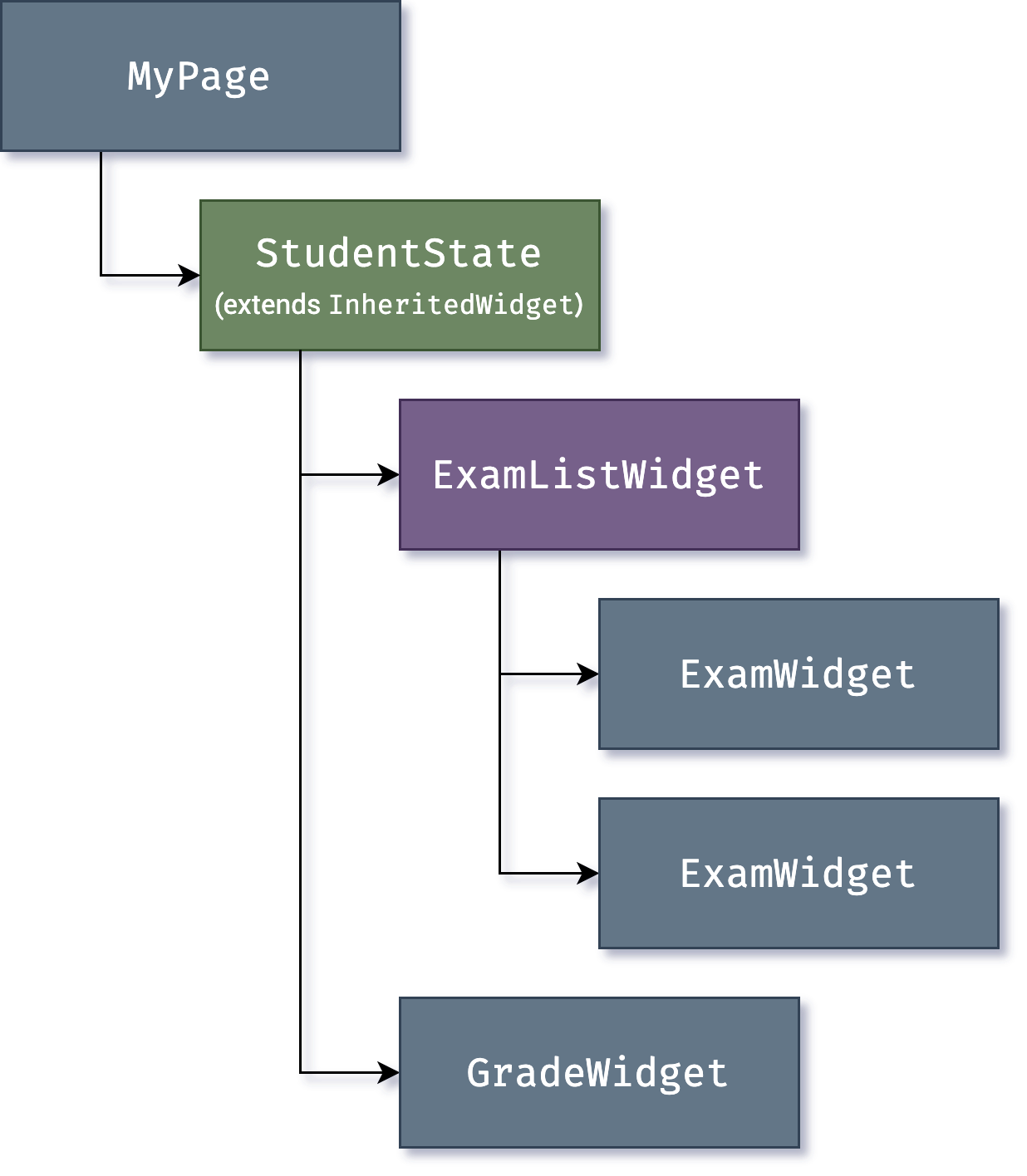
You can use `InheritedWidget` to create a state widget
that wraps a common ancestor in the
widget tree, as shown in this example:
{:width="50%" .diagram-wrap}
[`InheritedWidget`]: https://api.flutter.dev/flutter/widgets/InheritedWidget-class.html
Whenever one of the `ExamWidget` or `GradeWidget` objects needs data from
`StudentState`, it can now access it with a command such as:
```dart
final studentState = StudentState.of(context);
```
The `of(context)` call takes the build context
(a handle to the current widget location),
and returns [the nearest ancestor in the tree][]
that matches the `StudentState` type.
`InheritedWidget`s also offer an `updateShouldNotify()` method,
which Flutter calls to determine whether a state
change should trigger a rebuild of child widgets that use it.
[the nearest ancestor in the tree]: https://api.flutter.dev/flutter/widgets/BuildContext/dependOnInheritedWidgetOfExactType.html
Flutter itself uses `InheritedWidget` extensively as part
of the framework for shared state,
such as the application's _visual theme_, which includes
[properties like color and type styles][] that are
pervasive throughout an application.
The `MaterialApp` `build()` method inserts a theme
in the tree when it builds, and then deeper in the hierarchy a widget
can use the `.of()` method to look up the relevant theme data.
For example:
```dart
Container(
color: Theme.of(context).secondaryHeaderColor,
child: Text(
'Text with a background color',
style: Theme.of(context).textTheme.titleLarge,
),
);
```
[properties like color and type styles]: https://api.flutter.dev/flutter/material/ThemeData-class.html
As applications grow, more advanced state management approaches that reduce the
ceremony of creating and using stateful widgets become more attractive. Many
Flutter apps use utility packages like
[provider](https://pub.dev/packages/provider), which provides a wrapper around
`InheritedWidget`. Flutter's layered architecture also enables alternative
approaches to implement the transformation of state into UI, such as the
[flutter_hooks](https://pub.dev/packages/flutter_hooks) package.
## Rendering and layout
This section describes the rendering pipeline, which is the series of steps that
Flutter takes to convert a hierarchy of widgets into the actual pixels painted
onto a screen.
### Flutter's rendering model
You might be wondering: if Flutter is a cross-platform framework,
then how can it offer comparable performance to
single-platform frameworks?
It's useful to start by thinking about how traditional
Android apps work. When drawing,
you first call the Java code of the Android framework.
The Android system libraries provide the components
responsible for drawing themselves to a `Canvas` object,
which Android can then render with [Skia][],
a graphics engine written in C/C++ that calls the
CPU or GPU to complete the drawing on the device.
Cross-platform frameworks _typically_ work by creating
an abstraction layer over the underlying native
Android and iOS UI libraries, attempting to smooth out the
inconsistencies of each platform representation.
App code is often written in an interpreted language like JavaScript,
which must in turn interact with the Java-based
Android or Objective-C-based iOS system libraries to display UI.
All this adds overhead that can be significant,
particularly where there is a lot of
interaction between the UI and the app logic.
By contrast, Flutter minimizes those abstractions,
bypassing the system UI widget libraries in favor
of its own widget set. The Dart code that paints
Flutter's visuals is compiled into native code,
which uses Impeller for rendering.
Impeller is shipped along with the application,
allowing the developer to upgrade their app to stay
updated with the latest performance improvements
even if the phone hasn't been updated with a new Android version.
The same is true for Flutter on other native platforms,
such as Windows or macOS.
:::note
If you want to know which devices Impeller supports,
check out [Impeller availability][].
For more information,
visit [Impeller rendering engine][]
:::
[Impeller rendering engine]: /perf/impeller
### From user input to the GPU
The overriding principle that Flutter applies to its
rendering pipeline is that **simple is fast**.
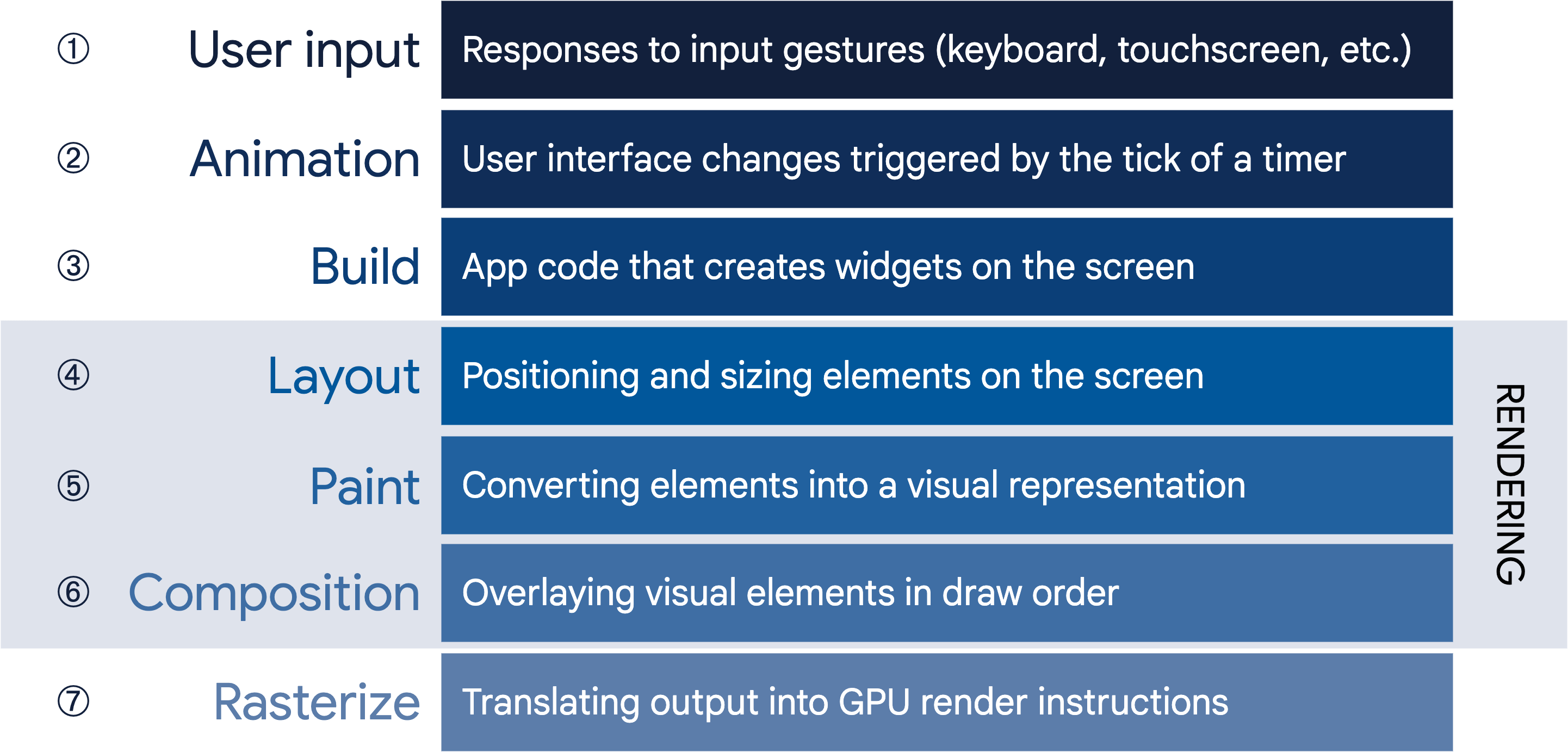
Flutter has a straightforward pipeline for how data flows to
the system, as shown in the following sequencing diagram:
{:width="100%" .diagram-wrap}
Let's take a look at some of these phases in greater detail.
### Build: from Widget to Element
Consider this code fragment that demonstrates a widget hierarchy:
```dart
Container(
color: Colors.blue,
child: Row(
children: [
Image.network('https://www.example.com/1.png'),
const Text('A'),
],
),
);
```
When Flutter needs to render this fragment,
it calls the `build()` method, which
returns a subtree of widgets that renders
UI-based on the current app state.
During this process,
the `build()` method can introduce new widgets,
as necessary, based on its state.
As an example, in the preceding code fragment,
`Container` has `color` and `child` properties.
From looking at the [source
code](https://github.com/flutter/flutter/blob/02efffc134ab4ce4ff50a9ddd86c832efdb80462/packages/flutter/lib/src/widgets/container.dart#L401)
for `Container`, you can see that if the color is not null,
it inserts a `ColoredBox` representing the color:
```dart
if (color != null)
current = ColoredBox(color: color!, child: current);
```
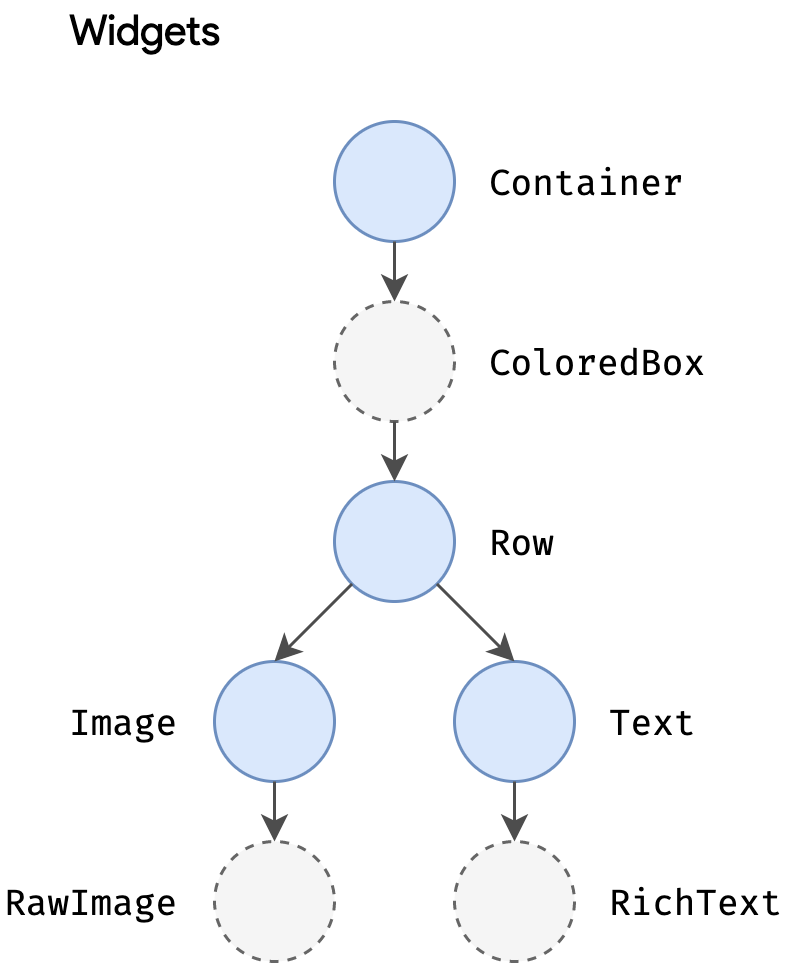
Correspondingly, the `Image` and `Text` widgets might insert child widgets such
as `RawImage` and `RichText` during the build process. The eventual widget
hierarchy might therefore be deeper than what the code represents,
as in this case[^2]:
{:width="40%" .diagram-wrap}
This explains why, when you examine the tree through
a debug tool such as the
[Flutter inspector](/tools/devtools/inspector),
part of the Flutter/Dart DevTools,
you might see a structure that is considerably deeper than what
is in your original code.
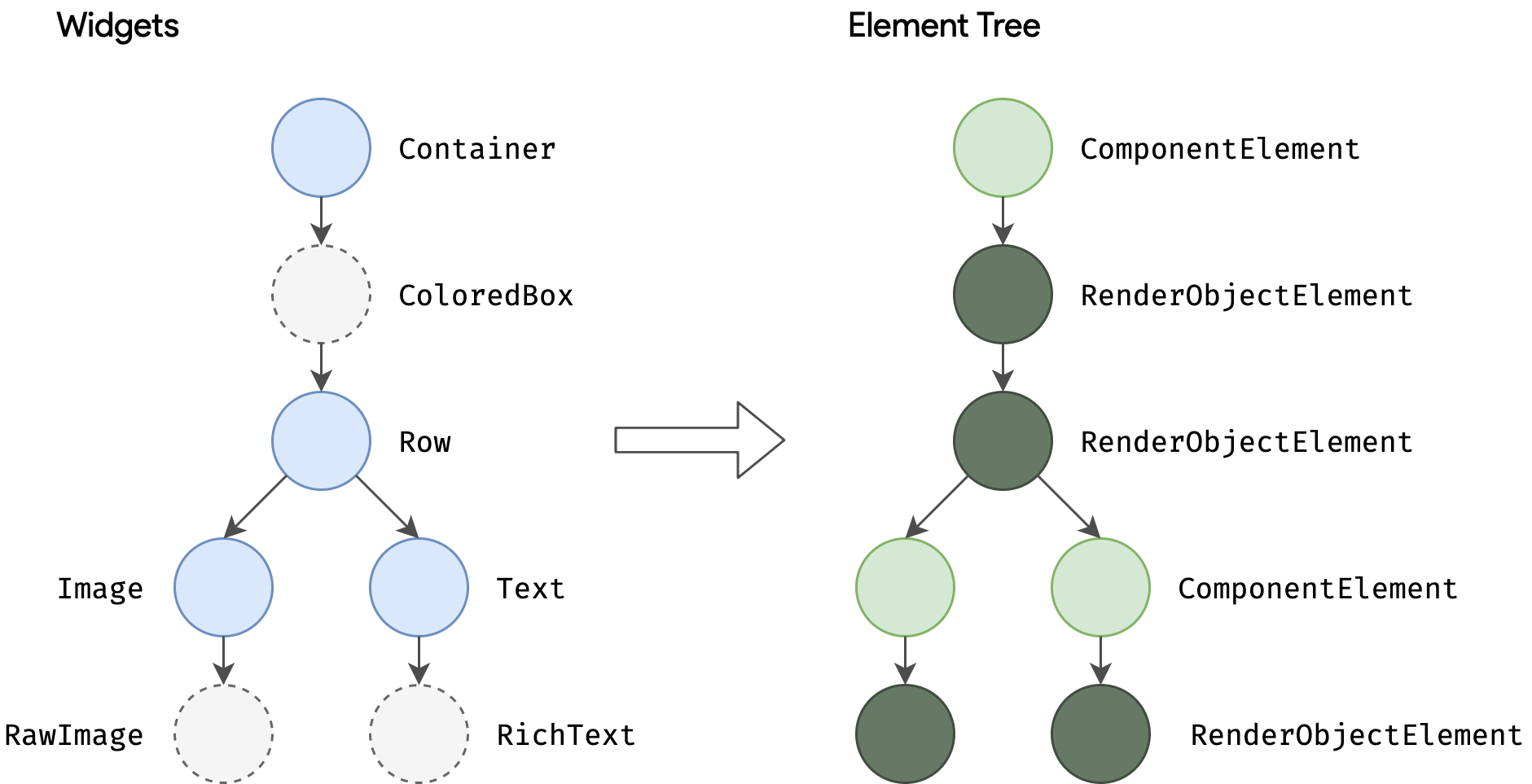
During the build phase, Flutter translates the widgets expressed in code into a
corresponding **element tree**, with one element for every widget. Each element
represents a specific instance of a widget in a given location of the tree
hierarchy. There are two basic types of elements:
- `ComponentElement`, a host for other elements.
- `RenderObjectElement`, an element that participates in the layout or paint
phases.
{:width="85%" .diagram-wrap}
`RenderObjectElement`s are an intermediary between their widget analog and the
underlying `RenderObject`, which we'll come to later.
The element for any widget can be referenced through its `BuildContext`, which
is a handle to the location of a widget in the tree. This is the `context` in a
function call such as `Theme.of(context)`, and is supplied to the `build()`
method as a parameter.
Because widgets are immutable, including the parent/child relationship between
nodes, any change to the widget tree (such as changing `Text('A')` to
`Text('B')` in the preceding example) causes a new set of widget objects to be
returned. But that doesn't mean the underlying representation must be rebuilt.
The element tree is persistent from frame to frame, and therefore plays a
critical performance role, allowing Flutter to act as if the widget hierarchy is
fully disposable while caching its underlying representation. By only walking
through the widgets that changed, Flutter can rebuild just the parts of the
element tree that require reconfiguration.
### Layout and rendering
It would be a rare application that drew only a single widget. An important part
of any UI framework is therefore the ability to efficiently lay out a hierarchy
of widgets, determining the size and position of each element before they are
rendered on the screen.
The base class for every node in the render tree is
[`RenderObject`](https://api.flutter.dev/flutter/rendering/RenderObject-class.html), which
defines an abstract model for layout and painting. This is extremely general: it
does not commit to a fixed number of dimensions or even a Cartesian coordinate
system (demonstrated by [this example of a polar coordinate
system](https://dartpad.dev/?id=596b1d6331e3b9d7b00420085fab3e27)). Each
`RenderObject` knows its parent, but knows little about its children other than
how to _visit_ them and their constraints. This provides `RenderObject` with
sufficient abstraction to be able to handle a variety of use cases.
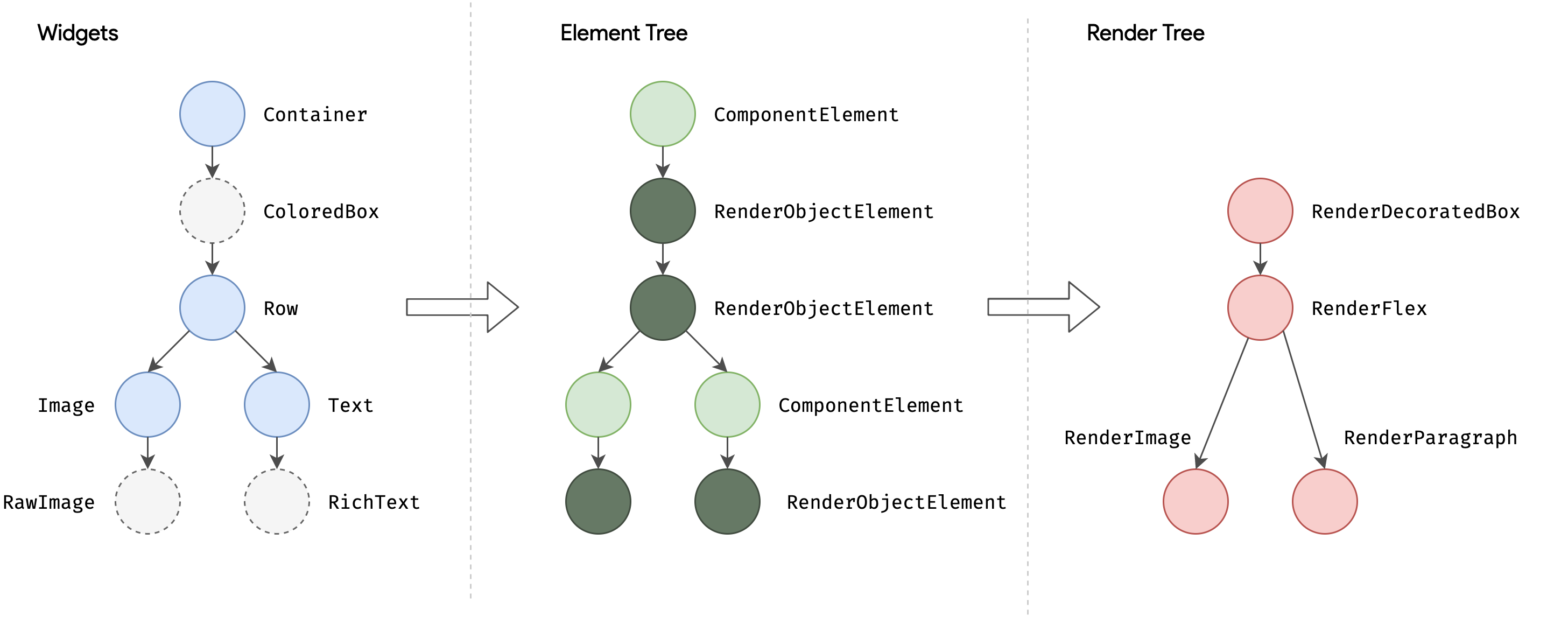
During the build phase, Flutter creates or updates an object that inherits from
`RenderObject` for each `RenderObjectElement` in the element tree.
`RenderObject`s are primitives:
[`RenderParagraph`](https://api.flutter.dev/flutter/rendering/RenderParagraph-class.html)
renders text,
[`RenderImage`](https://api.flutter.dev/flutter/rendering/RenderImage-class.html) renders
an image, and
[`RenderTransform`](https://api.flutter.dev/flutter/rendering/RenderTransform-class.html)
applies a transformation before painting its child.
{:width="100%" .diagram-wrap}
Most Flutter widgets are rendered by an object that inherits from the
`RenderBox` subclass, which represents a `RenderObject` of fixed size in a 2D
Cartesian space. `RenderBox` provides the basis of a _box constraint model_,
establishing a minimum and maximum width and height for each widget to be
rendered.
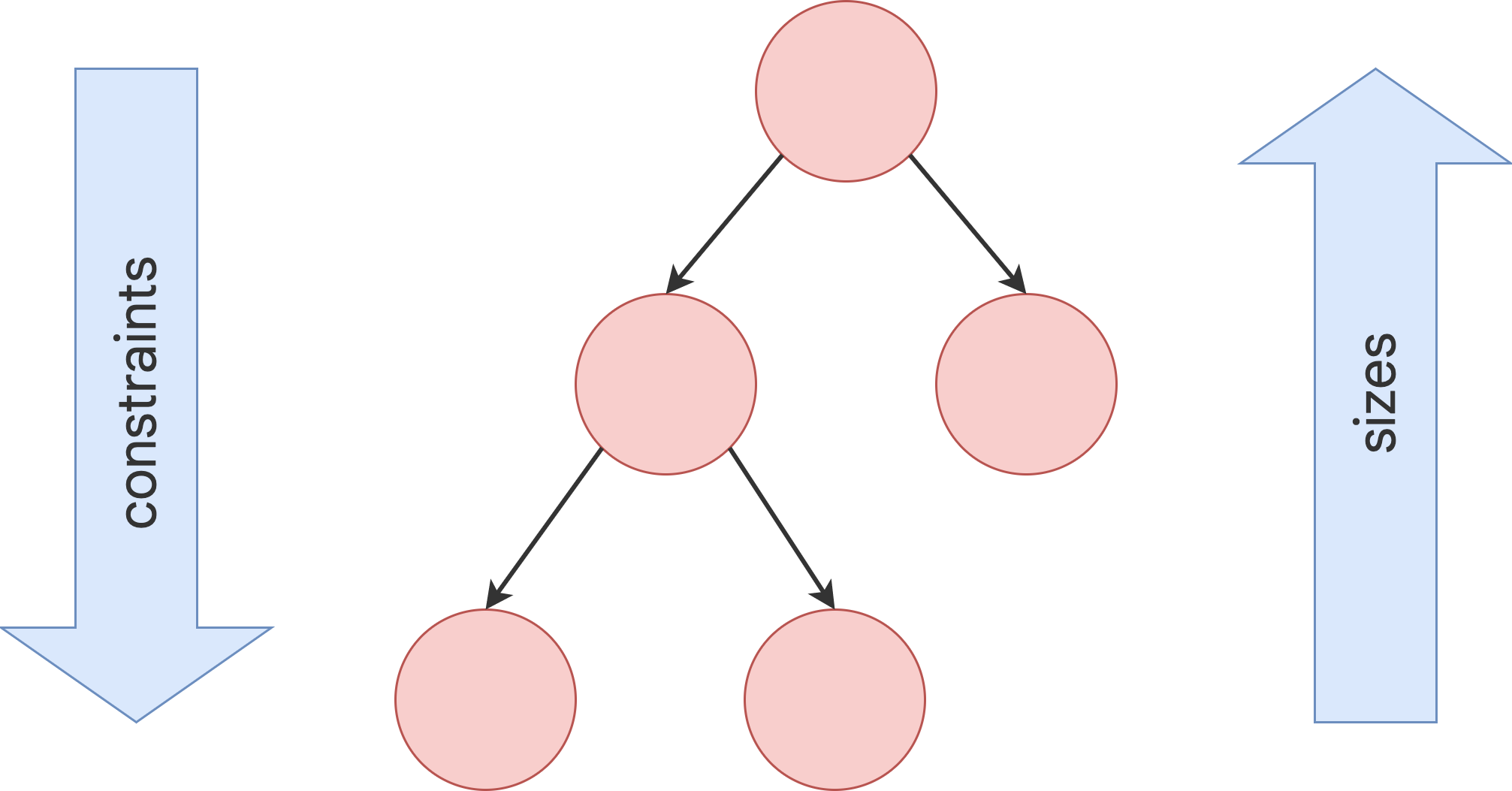
To perform layout, Flutter walks the render tree in a depth-first traversal and
**passes down size constraints** from parent to child. In determining its size,
the child _must_ respect the constraints given to it by its parent. Children
respond by **passing up a size** to their parent object within the constraints
the parent established.
{:width="70%" .diagram-wrap}
At the end of this single walk through the tree, every object has a defined size
within its parent's constraints and is ready to be painted by calling the
[`paint()`](https://api.flutter.dev/flutter/rendering/RenderObject/paint.html)
method.
The box constraint model is very powerful as a way to layout objects in _O(n)_
time:
- Parents can dictate the size of a child object by setting maximum and minimum
constraints to the same value. For example, the topmost render object in a
phone app constrains its child to be the size of the screen. (Children can
choose how to use that space. For example, they might just center what they
want to render within the dictated constraints.)
- A parent can dictate the child's width but give the child flexibility over
height (or dictate height but offer flexibility over width). A real-world example
is flow text, which might have to fit a horizontal constraint but vary
vertically depending on the quantity of text.
This model works even when a child object needs to know how much space it has
available to decide how it will render its content. By using a
[`LayoutBuilder`](https://api.flutter.dev/flutter/widgets/LayoutBuilder-class.html) widget,
the child object can examine the passed-down constraints and use those to
determine how it will use them, for example:
```dart
Widget build(BuildContext context) {
return LayoutBuilder(
builder: (context, constraints) {
if (constraints.maxWidth < 600) {
return const OneColumnLayout();
} else {
return const TwoColumnLayout();
}
},
);
}
```
More information about the constraint and layout system,
along with working examples, can be found in the
[Understanding constraints](/ui/layout/constraints) topic.
The root of all `RenderObject`s is the `RenderView`, which represents the total
output of the render tree. When the platform demands a new frame to be rendered
(for example, because of a
[vsync](https://source.android.com/devices/graphics/implement-vsync) or because
a texture decompression/upload is complete), a call is made to the
`compositeFrame()` method, which is part of the `RenderView` object at the root
of the render tree. This creates a `SceneBuilder` to trigger an update of the
scene. When the scene is complete, the `RenderView` object passes the composited
scene to the `Window.render()` method in `dart:ui`, which passes control to the
GPU to render it.
Further details of the composition and rasterization stages of the pipeline are
beyond the scope of this high-level article, but more information can be found
[in this talk on the Flutter rendering
pipeline](https://www.youtube.com/watch?v=UUfXWzp0-DU).
## Platform embedding
As we've seen, rather than being translated into the equivalent OS widgets,
Flutter user interfaces are built, laid out, composited, and painted by Flutter
itself. The mechanism for obtaining the texture and participating in the app
lifecycle of the underlying operating system inevitably varies depending on the
unique concerns of that platform. The engine is platform-agnostic,
presenting a [stable ABI (Application Binary Interface)][ABI].
that provides a _platform embedder_ with a way to set up and use Flutter.
[ABI]: https://github.com/flutter/flutter/blob/main/engine/src/flutter/shell/platform/embedder/embedder.h
The platform embedder is the native OS application that hosts all Flutter
content, and acts as the glue between the host operating system and Flutter.
When you start a Flutter app, the embedder provides the entrypoint,
initializes the Flutter engine, obtains threads for UI and rastering,
and creates a texture that Flutter can write to.
The embedder is also responsible for the app lifecycle,
including input gestures (such as mouse, keyboard, touch), window
sizing, thread management, and platform messages.
Flutter includes platform embedders for Android, iOS, Windows,
macOS, and Linux; you can also create a
custom platform embedder, as in [this worked
example](https://github.com/chinmaygarde/fluttercast) that supports remoting
Flutter sessions through a VNC-style framebuffer or [this worked example for
Raspberry Pi](https://github.com/ardera/flutter-pi).
Each platform has its own set of APIs and constraints. Some brief
platform-specific notes:
- As of Flutter 3.29, the UI and platform threads are merged on
iOS and Android. Specifically, the UI thread
is removed and the Dart code runs on the native platform thread.
For more information, see [The great thread merge][] video.
- On iOS and macOS, Flutter is loaded into the embedder as a `UIViewController`
or `NSViewController`, respectively. The platform embedder creates a
`FlutterEngine`, which serves as a host to the Dart VM and your Flutter
runtime, and a `FlutterViewController`, which attaches to the `FlutterEngine`
to pass UIKit or Cocoa input events into Flutter and to display frames
rendered by the `FlutterEngine` using Metal or OpenGL.
- On Android, Flutter is, by default, loaded into the embedder as an `Activity`.
The view is controlled by a
[`FlutterView`](https://api.flutter.dev/javadoc/io/flutter/embedding/android/FlutterView.html),
which renders Flutter content either as a view or a texture, depending on the
composition and z-ordering requirements of the Flutter content.
- On Windows, Flutter is hosted in a traditional Win32 app, and content is
rendered using
[ANGLE](https://chromium.googlesource.com/angle/angle/+/master/README.md), a
library that translates OpenGL API calls to the DirectX 11 equivalents.
[The great thread merge]: https://youtu.be/miW7vCmQwnw?si=9EYvRDxtkpkPrcSO
## Integrating with other code
Flutter provides a variety of interoperability mechanisms, whether you're
accessing code or APIs written in a language like Kotlin or Swift, calling a
native C-based API, embedding native controls in a Flutter app, or embedding
Flutter in an existing application.
### Platform channels
For mobile and desktop apps, Flutter allows you to call into custom code through
a _platform channel_, which is a mechanism for communicating between your
Dart code and the platform-specific code of your host app. By creating a common
channel (encapsulating a name and a codec), you can send and receive messages
between Dart and a platform component written in a language like Kotlin or
Swift. Data is serialized from a Dart type like `Map` into a standard format,
and then deserialized into an equivalent representation in Kotlin (such as
`HashMap`) or Swift (such as `Dictionary`).
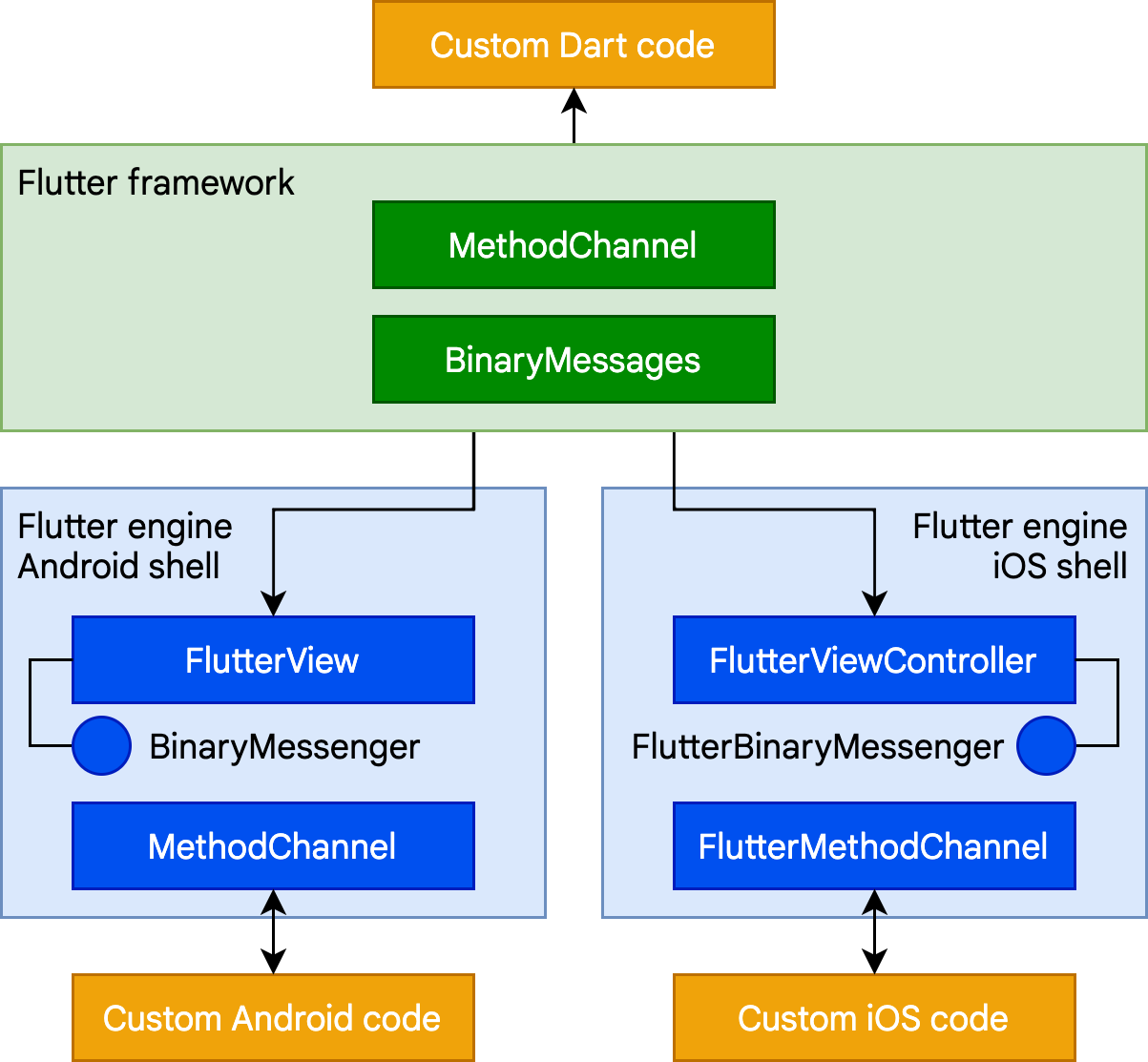{:width="65%" .diagram-wrap}
The following is a short platform channel example of a Dart call to a receiving
event handler in Kotlin (Android) or Swift (iOS):
```dart
// Dart side
const channel = MethodChannel('foo');
final greeting = await channel.invokeMethod('bar', 'world') as String;
print(greeting);
```
```kotlin
// Android (Kotlin)
val channel = MethodChannel(flutterView, "foo")
channel.setMethodCallHandler { call, result ->
when (call.method) {
"bar" -> result.success("Hello, ${call.arguments}")
else -> result.notImplemented()
}
}
```
```swift
// iOS (Swift)
let channel = FlutterMethodChannel(name: "foo", binaryMessenger: flutterView)
channel.setMethodCallHandler {
(call: FlutterMethodCall, result: FlutterResult) -> Void in
switch (call.method) {
case "bar": result("Hello, \(call.arguments as! String)")
default: result(FlutterMethodNotImplemented)
}
}
```
Further examples of using platform channels, including examples for desktop
platforms, can be found in the [flutter/packages](https://github.com/flutter/packages)
repository. There are also [thousands of plugins
already available](https://pub.dev/flutter) for Flutter that cover many common
scenarios, ranging from Firebase to ads to device hardware like camera and
Bluetooth.
### Foreign Function Interface (FFI)
For C-based APIs, including those that can be generated for code written in
modern languages like Rust or Go, Dart provides a direct mechanism for binding
to native code using the `dart:ffi` library. The foreign function interface
(FFI) model can be considerably faster than platform channels, because no
serialization is required to pass data. Instead, the Dart runtime provides the
ability to allocate memory on the heap that is backed by a Dart object and make
calls to statically or dynamically linked libraries. FFI is available for all
platforms other than web, where the [JS interop libraries][] and
[`package:web`][] serve a similar purpose.
To use FFI, you create a `typedef` for each of the Dart and unmanaged method
signatures, and instruct the Dart VM to map between them. As an example,
here's a fragment of code to call the traditional Win32 `MessageBox()` API:
```dart
import 'dart:ffi';
import 'package:ffi/ffi.dart'; // contains .toNativeUtf16() extension method
typedef MessageBoxNative =
Int32 Function(
IntPtr hWnd,
Pointer
**Dart App**
* Composes widgets into the desired UI.
* Implements business logic.
* Owned by app developer.
**Framework** ([source code](https://github.com/flutter/flutter/tree/main/packages/flutter/lib))
* Provides higher-level API to build high-quality apps
(for example, widgets, hit-testing, gesture detection,
accessibility, text input).
* Composites the app's widget tree into a scene.
**Engine** ([source code](https://github.com/flutter/flutter/tree/main/engine/src/flutter/shell/common))
* Responsible for rasterizing composited scenes.
* Provides low-level implementation of Flutter's core APIs
(for example, graphics, text layout, Dart runtime).
* Exposes its functionality to the framework using the **dart:ui API**.
* Integrates with a specific platform using the Engine's **Embedder API**.
**Embedder** ([source code](https://github.com/flutter/flutter/tree/main/engine/src/flutter/shell/platform))
* Coordinates with the underlying operating system
for access to services like rendering surfaces,
accessibility, and input.
* Manages the event loop.
* Exposes **platform-specific API** to integrate the Embedder into apps.
**Runner**
* Composes the pieces exposed by the platform-specific
API of the Embedder into an app package runnable on the target platform.
* Part of app template generated by `flutter create`,
owned by app developer.
## Reactive user interfaces
On the surface, Flutter is [a reactive, declarative UI framework][faq],
in which the developer provides a mapping from application state to interface
state, and the framework takes on the task of updating the interface at runtime
when the application state changes. This model is inspired by
[work that came from Facebook for their own React framework][fb],
which includes a rethinking of many traditional design principles.
[faq]: /resources/faq#what-programming-paradigm-does-flutters-framework-use
[fb]: https://www.youtube.com/watch?time_continue=2&v=x7cQ3mrcKaY&feature=emb_logo
In most traditional UI frameworks, the user interface's initial state is
described once and then separately updated by user code at runtime, in response
to events. One challenge of this approach is that, as the application grows in
complexity, the developer needs to be aware of how state changes cascade
throughout the entire UI. For example, consider the following UI:
{:width="66%"}
There are many places where the state can be changed: the color box, the hue
slider, the radio buttons. As the user interacts with the UI, changes must be
reflected in every other place. Worse, unless care is taken, a minor change to
one part of the user interface can cause ripple effects to seemingly unrelated
pieces of code.
One solution to this is an approach like MVC, where you push data changes to the
model through the controller, and then the model pushes the new state to the view
through the controller. However, this also is problematic, since creating and
updating UI elements are two separate steps that can easily get out of sync.
Flutter, along with other reactive frameworks, takes an alternative approach to
this problem, by explicitly decoupling the user interface from its underlying
state. With React-style APIs, you only create the UI description, and the
framework takes care of using that one configuration to both create and/or
update the user interface as appropriate.
In Flutter, widgets (akin to components in React) are represented by immutable
classes that are used to configure a tree of objects. These widgets are used to
manage a separate tree of objects for layout, which is then used to manage a
separate tree of objects for compositing. Flutter is, at its core, a series of
mechanisms for efficiently walking the modified parts of trees, converting trees
of objects into lower-level trees of objects, and propagating changes across
these trees.
A widget declares its user interface by overriding the `build()` method, which
is a function that converts state to UI:
```plaintext
UI = f(state)
```
The `build()` method is by design fast to execute and should be free of side
effects, allowing it to be called by the framework whenever needed (potentially
as often as once per rendered frame).
This approach relies on certain characteristics of a language runtime (in
particular, fast object instantiation and deletion). Fortunately, [Dart is
particularly well suited for this
task](https://blog.flutter.dev/flutter-dont-fear-the-garbage-collector-d69b3ff1ca30).
## Widgets
As mentioned, Flutter emphasizes widgets as a unit of composition. Widgets are
the building blocks of a Flutter app's user interface, and each widget is an
immutable declaration of part of the user interface.
Widgets form a hierarchy based on composition. Each widget nests inside its
parent and can receive context from the parent. This structure carries all the
way up to the root widget (the container that hosts the Flutter app, typically
`MaterialApp` or `CupertinoApp`), as this trivial example shows:
```dart
import 'package:flutter/material.dart';
import 'package:flutter/services.dart';
void main() => runApp(const MyApp());
class MyApp extends StatelessWidget {
const MyApp({super.key});
@override
Widget build(BuildContext context) {
return MaterialApp(
home: Scaffold(
appBar: AppBar(title: const Text('My Home Page')),
body: Center(
child: Builder(
builder: (context) {
return Column(
children: [
const Text('Hello World'),
const SizedBox(height: 20),
ElevatedButton(
onPressed: () {
print('Click!');
},
child: const Text('A button'),
),
],
);
},
),
),
),
);
}
}
```
In the preceding code, all instantiated classes are widgets.
Apps update their user interface in response to events (such as a user
interaction) by telling the framework to replace a widget in the hierarchy with
another widget. The framework then compares the new and old widgets, and
efficiently updates the user interface.
Flutter has its own implementations of each UI control, rather than deferring to
those provided by the system: for example, there is a pure [Dart
implementation](https://api.flutter.dev/flutter/cupertino/CupertinoSwitch-class.html)
of both the [iOS Toggle
control](https://developer.apple.com/design/human-interface-guidelines/toggles)
and the [one for](https://api.flutter.dev/flutter/material/Switch-class.html) the
[Android equivalent](https://m3.material.io/components/switch).
This approach provides several benefits:
* Provides for unlimited extensibility. A developer who wants a variant of the
Switch control can create one in any arbitrary way, and is not limited to the
extension points provided by the OS.
* Avoids a significant performance bottleneck by allowing Flutter to composite
the entire scene at once, without transitioning back and forth between Flutter
code and platform code.
* Decouples the application behavior from any operating system dependencies. The
application looks and feels the same on all versions of the OS, even if the OS
changed the implementations of its controls.
### Composition
Widgets are typically composed of many other small, single-purpose widgets that
combine to produce powerful effects.
Where possible, the number of design concepts is kept to a minimum while
allowing the total vocabulary to be large. For example, in the widgets layer,
Flutter uses the same core concept (a `Widget`) to represent drawing to the
screen, layout (positioning and sizing), user interactivity, state management,
theming, animations, and navigation. In the animation layer, a pair of concepts,
`Animation`s and `Tween`s, cover most of the design space. In the rendering
layer, `RenderObject`s are used to describe layout, painting, hit testing, and
accessibility. In each of these cases, the corresponding vocabulary ends up
being large: there are hundreds of widgets and render objects, and dozens of
animation and tween types.
The class hierarchy is deliberately shallow and broad to maximize the possible
number of combinations, focusing on small, composable widgets that each do one
thing well. Core features are abstract, with even basic features like padding
and alignment being implemented as separate components rather than being built
into the core. (This also contrasts with more traditional APIs where features
like padding are built in to the common core of every layout component.) So, for
example, to center a widget, rather than adjusting a notional `Align` property,
you wrap it in a [`Center`](https://api.flutter.dev/flutter/widgets/Center-class.html)
widget.
There are widgets for padding, alignment, rows, columns, and grids. These layout
widgets do not have a visual representation of their own. Instead, their sole
purpose is to control some aspect of another widget's layout. Flutter also
includes utility widgets that take advantage of this compositional approach.
For example, [`Container`](https://api.flutter.dev/flutter/widgets/Container-class.html), a
commonly used widget, is made up of several widgets responsible for layout,
painting, positioning, and sizing. Specifically, `Container` is made up of the
[`LimitedBox`](https://api.flutter.dev/flutter/widgets/LimitedBox-class.html),
[`ConstrainedBox`](https://api.flutter.dev/flutter/widgets/ConstrainedBox-class.html),
[`Align`](https://api.flutter.dev/flutter/widgets/Align-class.html),
[`Padding`](https://api.flutter.dev/flutter/widgets/Padding-class.html),
[`DecoratedBox`](https://api.flutter.dev/flutter/widgets/DecoratedBox-class.html), and
[`Transform`](https://api.flutter.dev/flutter/widgets/Transform-class.html) widgets, as you
can see by reading its source code. A defining characteristic of Flutter is that
you can drill down into the source for any widget and examine it. So, rather
than subclassing `Container` to produce a customized effect, you can compose it
and other widgets in novel ways, or just create a new widget using
`Container` as inspiration.
### Building widgets
As mentioned earlier, you determine the visual representation of a widget by
overriding the
[`build()`](https://api.flutter.dev/flutter/widgets/StatelessWidget/build.html) function to
return a new element tree. This tree represents the widget's part of the user
interface in more concrete terms. For example, a toolbar widget might have a
build function that returns a [horizontal
layout](https://api.flutter.dev/flutter/widgets/Row-class.html) of some
[text](https://api.flutter.dev/flutter/widgets/Text-class.html) and
[various](https://api.flutter.dev/flutter/material/IconButton-class.html)
[buttons](https://api.flutter.dev/flutter/material/PopupMenuButton-class.html). As needed,
the framework recursively asks each widget to build until the tree is entirely
described by [concrete renderable
objects](https://api.flutter.dev/flutter/widgets/RenderObjectWidget-class.html). The
framework then stitches together the renderable objects into a renderable object
tree.
A widget's build function should be free of side effects. Whenever the function
is asked to build, the widget should return a new tree of widgets[^1],
regardless of what the widget previously returned. The
framework does the heavy lifting work to determine which build methods need to
be called based on the render object tree (described in more detail later). More
information about this process can be found in the [Inside Flutter
topic](/resources/inside-flutter#linear-reconciliation).
On each rendered frame, Flutter can recreate just the parts of the UI where the
state has changed by calling that widget's `build()` method. Therefore it is
important that build methods should return quickly, and heavy computational work
should be done in some asynchronous manner and then stored as part of the state
to be used by a build method.
While relatively naive in approach, this automated comparison is quite
effective, enabling high-performance, interactive apps. And, the design of the
build function simplifies your code by focusing on declaring what a widget is
made of, rather than the complexities of updating the user interface from one
state to another.
### Widget state
The framework introduces two major classes of widget: _stateful_ and _stateless_
widgets.
Many widgets have no mutable state: they don't have any properties that change
over time (for example, an icon or a label). These widgets subclass
[`StatelessWidget`](https://api.flutter.dev/flutter/widgets/StatelessWidget-class.html).
However, if the unique characteristics of a widget needs to change based on user
interaction or other factors, that widget is _stateful_. For example, if a
widget has a counter that increments whenever the user taps a button, then the
value of the counter is the state for that widget. When that value changes, the
widget needs to be rebuilt to update its part of the UI. These widgets subclass
[`StatefulWidget`](https://api.flutter.dev/flutter/widgets/StatefulWidget-class.html), and
(because the widget itself is immutable) they store mutable state in a separate
class that subclasses [`State`](https://api.flutter.dev/flutter/widgets/State-class.html).
`StatefulWidget`s don't have a build method; instead, their user interface is
built through their `State` object.
Whenever you mutate a `State` object (for example, by incrementing the counter),
you must call [`setState()`](https://api.flutter.dev/flutter/widgets/State/setState.html)
to signal the framework to update the user interface by calling the `State`'s
build method again.
Having separate state and widget objects lets other widgets treat both stateless
and stateful widgets in exactly the same way, without being concerned about
losing state. Instead of needing to hold on to a child to preserve its state,
the parent can create a new instance of the child at any time without losing the
child's persistent state. The framework does all the work of finding and reusing
existing state objects when appropriate.
### State management
So, if many widgets can contain state, how is state managed and passed around
the system?
As with any other class,
you can use a constructor in a widget to initialize its data,
so a `build()` method can ensure that any child widget
is instantiated with the data it needs:
```dart
@override
Widget build(BuildContext context) {
return ContentWidget([!importantState!]);
}
```
Where `importantState` is a placeholder for the class
that contains the state important to the `Widget`.
As widget trees get deeper, however,
passing state information up and down the
tree hierarchy becomes cumbersome.
So, a third widget type, [`InheritedWidget`][],
provides an easy way to grab data from a shared ancestor.
You can use `InheritedWidget` to create a state widget
that wraps a common ancestor in the
widget tree, as shown in this example:
{:width="50%" .diagram-wrap}
[`InheritedWidget`]: https://api.flutter.dev/flutter/widgets/InheritedWidget-class.html
Whenever one of the `ExamWidget` or `GradeWidget` objects needs data from
`StudentState`, it can now access it with a command such as:
```dart
final studentState = StudentState.of(context);
```
The `of(context)` call takes the build context
(a handle to the current widget location),
and returns [the nearest ancestor in the tree][]
that matches the `StudentState` type.
`InheritedWidget`s also offer an `updateShouldNotify()` method,
which Flutter calls to determine whether a state
change should trigger a rebuild of child widgets that use it.
[the nearest ancestor in the tree]: https://api.flutter.dev/flutter/widgets/BuildContext/dependOnInheritedWidgetOfExactType.html
Flutter itself uses `InheritedWidget` extensively as part
of the framework for shared state,
such as the application's _visual theme_, which includes
[properties like color and type styles][] that are
pervasive throughout an application.
The `MaterialApp` `build()` method inserts a theme
in the tree when it builds, and then deeper in the hierarchy a widget
can use the `.of()` method to look up the relevant theme data.
For example:
```dart
Container(
color: Theme.of(context).secondaryHeaderColor,
child: Text(
'Text with a background color',
style: Theme.of(context).textTheme.titleLarge,
),
);
```
[properties like color and type styles]: https://api.flutter.dev/flutter/material/ThemeData-class.html
As applications grow, more advanced state management approaches that reduce the
ceremony of creating and using stateful widgets become more attractive. Many
Flutter apps use utility packages like
[provider](https://pub.dev/packages/provider), which provides a wrapper around
`InheritedWidget`. Flutter's layered architecture also enables alternative
approaches to implement the transformation of state into UI, such as the
[flutter_hooks](https://pub.dev/packages/flutter_hooks) package.
## Rendering and layout
This section describes the rendering pipeline, which is the series of steps that
Flutter takes to convert a hierarchy of widgets into the actual pixels painted
onto a screen.
### Flutter's rendering model
You might be wondering: if Flutter is a cross-platform framework,
then how can it offer comparable performance to
single-platform frameworks?
It's useful to start by thinking about how traditional
Android apps work. When drawing,
you first call the Java code of the Android framework.
The Android system libraries provide the components
responsible for drawing themselves to a `Canvas` object,
which Android can then render with [Skia][],
a graphics engine written in C/C++ that calls the
CPU or GPU to complete the drawing on the device.
Cross-platform frameworks _typically_ work by creating
an abstraction layer over the underlying native
Android and iOS UI libraries, attempting to smooth out the
inconsistencies of each platform representation.
App code is often written in an interpreted language like JavaScript,
which must in turn interact with the Java-based
Android or Objective-C-based iOS system libraries to display UI.
All this adds overhead that can be significant,
particularly where there is a lot of
interaction between the UI and the app logic.
By contrast, Flutter minimizes those abstractions,
bypassing the system UI widget libraries in favor
of its own widget set. The Dart code that paints
Flutter's visuals is compiled into native code,
which uses Impeller for rendering.
Impeller is shipped along with the application,
allowing the developer to upgrade their app to stay
updated with the latest performance improvements
even if the phone hasn't been updated with a new Android version.
The same is true for Flutter on other native platforms,
such as Windows or macOS.
:::note
If you want to know which devices Impeller supports,
check out [Impeller availability][].
For more information,
visit [Impeller rendering engine][]
:::
[Impeller rendering engine]: /perf/impeller
### From user input to the GPU
The overriding principle that Flutter applies to its
rendering pipeline is that **simple is fast**.
Flutter has a straightforward pipeline for how data flows to
the system, as shown in the following sequencing diagram:
{:width="100%" .diagram-wrap}
Let's take a look at some of these phases in greater detail.
### Build: from Widget to Element
Consider this code fragment that demonstrates a widget hierarchy:
```dart
Container(
color: Colors.blue,
child: Row(
children: [
Image.network('https://www.example.com/1.png'),
const Text('A'),
],
),
);
```
When Flutter needs to render this fragment,
it calls the `build()` method, which
returns a subtree of widgets that renders
UI-based on the current app state.
During this process,
the `build()` method can introduce new widgets,
as necessary, based on its state.
As an example, in the preceding code fragment,
`Container` has `color` and `child` properties.
From looking at the [source
code](https://github.com/flutter/flutter/blob/02efffc134ab4ce4ff50a9ddd86c832efdb80462/packages/flutter/lib/src/widgets/container.dart#L401)
for `Container`, you can see that if the color is not null,
it inserts a `ColoredBox` representing the color:
```dart
if (color != null)
current = ColoredBox(color: color!, child: current);
```
Correspondingly, the `Image` and `Text` widgets might insert child widgets such
as `RawImage` and `RichText` during the build process. The eventual widget
hierarchy might therefore be deeper than what the code represents,
as in this case[^2]:
{:width="40%" .diagram-wrap}
This explains why, when you examine the tree through
a debug tool such as the
[Flutter inspector](/tools/devtools/inspector),
part of the Flutter/Dart DevTools,
you might see a structure that is considerably deeper than what
is in your original code.
During the build phase, Flutter translates the widgets expressed in code into a
corresponding **element tree**, with one element for every widget. Each element
represents a specific instance of a widget in a given location of the tree
hierarchy. There are two basic types of elements:
- `ComponentElement`, a host for other elements.
- `RenderObjectElement`, an element that participates in the layout or paint
phases.
{:width="85%" .diagram-wrap}
`RenderObjectElement`s are an intermediary between their widget analog and the
underlying `RenderObject`, which we'll come to later.
The element for any widget can be referenced through its `BuildContext`, which
is a handle to the location of a widget in the tree. This is the `context` in a
function call such as `Theme.of(context)`, and is supplied to the `build()`
method as a parameter.
Because widgets are immutable, including the parent/child relationship between
nodes, any change to the widget tree (such as changing `Text('A')` to
`Text('B')` in the preceding example) causes a new set of widget objects to be
returned. But that doesn't mean the underlying representation must be rebuilt.
The element tree is persistent from frame to frame, and therefore plays a
critical performance role, allowing Flutter to act as if the widget hierarchy is
fully disposable while caching its underlying representation. By only walking
through the widgets that changed, Flutter can rebuild just the parts of the
element tree that require reconfiguration.
### Layout and rendering
It would be a rare application that drew only a single widget. An important part
of any UI framework is therefore the ability to efficiently lay out a hierarchy
of widgets, determining the size and position of each element before they are
rendered on the screen.
The base class for every node in the render tree is
[`RenderObject`](https://api.flutter.dev/flutter/rendering/RenderObject-class.html), which
defines an abstract model for layout and painting. This is extremely general: it
does not commit to a fixed number of dimensions or even a Cartesian coordinate
system (demonstrated by [this example of a polar coordinate
system](https://dartpad.dev/?id=596b1d6331e3b9d7b00420085fab3e27)). Each
`RenderObject` knows its parent, but knows little about its children other than
how to _visit_ them and their constraints. This provides `RenderObject` with
sufficient abstraction to be able to handle a variety of use cases.
During the build phase, Flutter creates or updates an object that inherits from
`RenderObject` for each `RenderObjectElement` in the element tree.
`RenderObject`s are primitives:
[`RenderParagraph`](https://api.flutter.dev/flutter/rendering/RenderParagraph-class.html)
renders text,
[`RenderImage`](https://api.flutter.dev/flutter/rendering/RenderImage-class.html) renders
an image, and
[`RenderTransform`](https://api.flutter.dev/flutter/rendering/RenderTransform-class.html)
applies a transformation before painting its child.
{:width="100%" .diagram-wrap}
Most Flutter widgets are rendered by an object that inherits from the
`RenderBox` subclass, which represents a `RenderObject` of fixed size in a 2D
Cartesian space. `RenderBox` provides the basis of a _box constraint model_,
establishing a minimum and maximum width and height for each widget to be
rendered.
To perform layout, Flutter walks the render tree in a depth-first traversal and
**passes down size constraints** from parent to child. In determining its size,
the child _must_ respect the constraints given to it by its parent. Children
respond by **passing up a size** to their parent object within the constraints
the parent established.
{:width="70%" .diagram-wrap}
At the end of this single walk through the tree, every object has a defined size
within its parent's constraints and is ready to be painted by calling the
[`paint()`](https://api.flutter.dev/flutter/rendering/RenderObject/paint.html)
method.
The box constraint model is very powerful as a way to layout objects in _O(n)_
time:
- Parents can dictate the size of a child object by setting maximum and minimum
constraints to the same value. For example, the topmost render object in a
phone app constrains its child to be the size of the screen. (Children can
choose how to use that space. For example, they might just center what they
want to render within the dictated constraints.)
- A parent can dictate the child's width but give the child flexibility over
height (or dictate height but offer flexibility over width). A real-world example
is flow text, which might have to fit a horizontal constraint but vary
vertically depending on the quantity of text.
This model works even when a child object needs to know how much space it has
available to decide how it will render its content. By using a
[`LayoutBuilder`](https://api.flutter.dev/flutter/widgets/LayoutBuilder-class.html) widget,
the child object can examine the passed-down constraints and use those to
determine how it will use them, for example:
```dart
Widget build(BuildContext context) {
return LayoutBuilder(
builder: (context, constraints) {
if (constraints.maxWidth < 600) {
return const OneColumnLayout();
} else {
return const TwoColumnLayout();
}
},
);
}
```
More information about the constraint and layout system,
along with working examples, can be found in the
[Understanding constraints](/ui/layout/constraints) topic.
The root of all `RenderObject`s is the `RenderView`, which represents the total
output of the render tree. When the platform demands a new frame to be rendered
(for example, because of a
[vsync](https://source.android.com/devices/graphics/implement-vsync) or because
a texture decompression/upload is complete), a call is made to the
`compositeFrame()` method, which is part of the `RenderView` object at the root
of the render tree. This creates a `SceneBuilder` to trigger an update of the
scene. When the scene is complete, the `RenderView` object passes the composited
scene to the `Window.render()` method in `dart:ui`, which passes control to the
GPU to render it.
Further details of the composition and rasterization stages of the pipeline are
beyond the scope of this high-level article, but more information can be found
[in this talk on the Flutter rendering
pipeline](https://www.youtube.com/watch?v=UUfXWzp0-DU).
## Platform embedding
As we've seen, rather than being translated into the equivalent OS widgets,
Flutter user interfaces are built, laid out, composited, and painted by Flutter
itself. The mechanism for obtaining the texture and participating in the app
lifecycle of the underlying operating system inevitably varies depending on the
unique concerns of that platform. The engine is platform-agnostic,
presenting a [stable ABI (Application Binary Interface)][ABI].
that provides a _platform embedder_ with a way to set up and use Flutter.
[ABI]: https://github.com/flutter/flutter/blob/main/engine/src/flutter/shell/platform/embedder/embedder.h
The platform embedder is the native OS application that hosts all Flutter
content, and acts as the glue between the host operating system and Flutter.
When you start a Flutter app, the embedder provides the entrypoint,
initializes the Flutter engine, obtains threads for UI and rastering,
and creates a texture that Flutter can write to.
The embedder is also responsible for the app lifecycle,
including input gestures (such as mouse, keyboard, touch), window
sizing, thread management, and platform messages.
Flutter includes platform embedders for Android, iOS, Windows,
macOS, and Linux; you can also create a
custom platform embedder, as in [this worked
example](https://github.com/chinmaygarde/fluttercast) that supports remoting
Flutter sessions through a VNC-style framebuffer or [this worked example for
Raspberry Pi](https://github.com/ardera/flutter-pi).
Each platform has its own set of APIs and constraints. Some brief
platform-specific notes:
- As of Flutter 3.29, the UI and platform threads are merged on
iOS and Android. Specifically, the UI thread
is removed and the Dart code runs on the native platform thread.
For more information, see [The great thread merge][] video.
- On iOS and macOS, Flutter is loaded into the embedder as a `UIViewController`
or `NSViewController`, respectively. The platform embedder creates a
`FlutterEngine`, which serves as a host to the Dart VM and your Flutter
runtime, and a `FlutterViewController`, which attaches to the `FlutterEngine`
to pass UIKit or Cocoa input events into Flutter and to display frames
rendered by the `FlutterEngine` using Metal or OpenGL.
- On Android, Flutter is, by default, loaded into the embedder as an `Activity`.
The view is controlled by a
[`FlutterView`](https://api.flutter.dev/javadoc/io/flutter/embedding/android/FlutterView.html),
which renders Flutter content either as a view or a texture, depending on the
composition and z-ordering requirements of the Flutter content.
- On Windows, Flutter is hosted in a traditional Win32 app, and content is
rendered using
[ANGLE](https://chromium.googlesource.com/angle/angle/+/master/README.md), a
library that translates OpenGL API calls to the DirectX 11 equivalents.
[The great thread merge]: https://youtu.be/miW7vCmQwnw?si=9EYvRDxtkpkPrcSO
## Integrating with other code
Flutter provides a variety of interoperability mechanisms, whether you're
accessing code or APIs written in a language like Kotlin or Swift, calling a
native C-based API, embedding native controls in a Flutter app, or embedding
Flutter in an existing application.
### Platform channels
For mobile and desktop apps, Flutter allows you to call into custom code through
a _platform channel_, which is a mechanism for communicating between your
Dart code and the platform-specific code of your host app. By creating a common
channel (encapsulating a name and a codec), you can send and receive messages
between Dart and a platform component written in a language like Kotlin or
Swift. Data is serialized from a Dart type like `Map` into a standard format,
and then deserialized into an equivalent representation in Kotlin (such as
`HashMap`) or Swift (such as `Dictionary`).
{:width="65%" .diagram-wrap}
The following is a short platform channel example of a Dart call to a receiving
event handler in Kotlin (Android) or Swift (iOS):
```dart
// Dart side
const channel = MethodChannel('foo');
final greeting = await channel.invokeMethod('bar', 'world') as String;
print(greeting);
```
```kotlin
// Android (Kotlin)
val channel = MethodChannel(flutterView, "foo")
channel.setMethodCallHandler { call, result ->
when (call.method) {
"bar" -> result.success("Hello, ${call.arguments}")
else -> result.notImplemented()
}
}
```
```swift
// iOS (Swift)
let channel = FlutterMethodChannel(name: "foo", binaryMessenger: flutterView)
channel.setMethodCallHandler {
(call: FlutterMethodCall, result: FlutterResult) -> Void in
switch (call.method) {
case "bar": result("Hello, \(call.arguments as! String)")
default: result(FlutterMethodNotImplemented)
}
}
```
Further examples of using platform channels, including examples for desktop
platforms, can be found in the [flutter/packages](https://github.com/flutter/packages)
repository. There are also [thousands of plugins
already available](https://pub.dev/flutter) for Flutter that cover many common
scenarios, ranging from Firebase to ads to device hardware like camera and
Bluetooth.
### Foreign Function Interface (FFI)
For C-based APIs, including those that can be generated for code written in
modern languages like Rust or Go, Dart provides a direct mechanism for binding
to native code using the `dart:ffi` library. The foreign function interface
(FFI) model can be considerably faster than platform channels, because no
serialization is required to pass data. Instead, the Dart runtime provides the
ability to allocate memory on the heap that is backed by a Dart object and make
calls to statically or dynamically linked libraries. FFI is available for all
platforms other than web, where the [JS interop libraries][] and
[`package:web`][] serve a similar purpose.
To use FFI, you create a `typedef` for each of the Dart and unmanaged method
signatures, and instruct the Dart VM to map between them. As an example,
here's a fragment of code to call the traditional Win32 `MessageBox()` API:
```dart
import 'dart:ffi';
import 'package:ffi/ffi.dart'; // contains .toNativeUtf16() extension method
typedef MessageBoxNative =
Int32 Function(
IntPtr hWnd,
Pointer| Renderer | Compilation target |
|---|---|
| CanvasKit | JavaScript |
| Skwasm | WebAssembly |
| Build mode | Available renderer(s) |
|---|---|
| default | CanvasKit |
| `--wasm` | Skwasm (preferred), CanvasKit (fallback) |