# UIScene adoption
> Learn how to migrate your Flutter iOS app, add-to-app integration, or plugin to Apple's required UIScene lifecycle.
:::important
These breaking change docs are accurate, as of the release
under which they are published. Over time, the
workarounds described here might become inaccurate.
We don't, in general, keep these breaking change docs up
to date as of each release.
The [breaking change index file](/release/breaking-changes)
lists the docs created for each release.
:::
:::important
As of the Flutter 3.41 release,
`UIScene` support is the default for iOS apps, and
eligible apps are migrated automatically.
:::
## Summary
Apple now requires iOS developers to adopt the `UIScene` lifecycle.
This migration has implications for the
[app launch sequence][] and [app lifecycle][].
[app launch sequence]: https://developer.apple.com/documentation/uikit/about-the-app-launch-sequence
[app lifecycle]: https://developer.apple.com/documentation/uikit/managing-your-app-s-life-cycle
## Background
During WWDC25, Apple [announced][uiscene-announcement] the following:
> In the release following iOS 26, any UIKit app built with the latest SDK will
> be required to use the UIScene life cycle, otherwise it will not launch.
To adopt the `UIScene` lifecycle,
follow the guide that corresponds to your use case:
* For all Flutter apps that support iOS,
follow the [migration guide for Flutter apps][].
* For Flutter apps embedded in existing native iOS apps,
follow the [migration guide for add-to-app][].
* For Flutter plugins that use iOS application lifecycle events,
follow the [migration guide for Flutter plugins][].
Migrating to `UIScene` shifts the role of the `AppDelegate`:
the `UISceneDelegate` now handles the UI lifecycle,
while the `AppDelegate` remains responsible for
process events and the overall application lifecycle.
Move all UI-related logic from the `AppDelegate` to the
corresponding `UISceneDelegate` methods.
After you migrate to `UIScene`, UIKit no longer
calls `AppDelegate` methods related to UI state.
[uiscene-announcement]: https://developer.apple.com/videos/play/wwdc2025/243/?time=1317
[migration guide for Flutter apps]: #migrate-a-flutter-app
[migration guide for add-to-app]: #migrate-an-add-to-app-integration
[migration guide for Flutter plugins]: #migrate-a-flutter-plugin
## Migrate a Flutter app
### Auto-migrate
As of Flutter 3.41, `UIScene` is supported by default.
If your `AppDelegate` hasn't been customized,
the Flutter CLI automatically migrates your app.
To trigger the migration, build or run your app with
the `flutter run` or `flutter build ios` commands.
If the migration succeeds,
the CLI outputs `Finished migration to UIScene lifecycle` and
no further action is required.
Otherwise, the CLI warns you and
provides instructions to migrate manually.
### Migrate AppDelegate
Previously, Flutter plugins were registered in
`application:didFinishLaunchingWithOptions:`.
To accommodate the new app launch sequence,
you must now register plugins in a
new `didInitializeImplicitFlutterEngine` callback.
1. Conform your `AppDelegate` to the `FlutterImplicitEngineDelegate`
protocol and move the `GeneratedPluginRegistrant` registration to
`didInitializeImplicitFlutterEngine`.
```swift title="my_app/ios/Runner/AppDelegate.swift" diff
- @objc class AppDelegate: FlutterAppDelegate {
+ @objc class AppDelegate: FlutterAppDelegate, FlutterImplicitEngineDelegate {
override func application(
_ application: UIApplication,
didFinishLaunchingWithOptions launchOptions: [UIApplication.LaunchOptionsKey: Any]?
) -> Bool {
- GeneratedPluginRegistrant.register(with: self)
return super.application(application, didFinishLaunchingWithOptions: launchOptions)
}
+ func didInitializeImplicitFlutterEngine(_ engineBridge: FlutterImplicitEngineBridge) {
+ GeneratedPluginRegistrant.register(with: engineBridge.pluginRegistry)
+ }
}
```
```objc title="my_app/ios/Runner/AppDelegate.h" diff
- @interface AppDelegate : FlutterAppDelegate
+ @interface AppDelegate : FlutterAppDelegate
```
```objc title="my_app/ios/Runner/AppDelegate.m" diff
- (BOOL)application:(UIApplication *)application
didFinishLaunchingWithOptions:(NSDictionary *)launchOptions {
- [GeneratedPluginRegistrant registerWithRegistry:self];
return [super application:application didFinishLaunchingWithOptions:launchOptions];
}
+ - (void)didInitializeImplicitFlutterEngine:(NSObject*)engineBridge {
+ [GeneratedPluginRegistrant registerWithRegistry:engineBridge.pluginRegistry];
+ }
```
1. If applicable, create method channels and platform views in
`didInitializeImplicitFlutterEngine`.
If you previously created [method channels][] or [platform views][]
in `application:didFinishLaunchingWithOptions:`,
move that logic to `didInitializeImplicitFlutterEngine`.
```swift
func didInitializeImplicitFlutterEngine(_ engineBridge: FlutterImplicitEngineBridge) {
// Register plugins with `engineBridge.pluginRegistry`:
GeneratedPluginRegistrant.register(with: engineBridge.pluginRegistry)
// Create method channels with `engineBridge.applicationRegistrar.messenger()`:
let batteryChannel = FlutterMethodChannel(
name: "samples.flutter.dev/battery",
binaryMessenger: engineBridge.applicationRegistrar.messenger()
)
// Create platform views with `engineBridge.applicationRegistrar.messenger()`:
let factory = FLNativeViewFactory(messenger: engineBridge.applicationRegistrar.messenger())
}
```
```objc
- (void)didInitializeImplicitFlutterEngine:(NSObject*)engineBridge {
// Register plugins with `engineBridge.pluginRegistry`:
[GeneratedPluginRegistrant registerWithRegistry:engineBridge.pluginRegistry];
// Create method channels with `engineBridge.applicationRegistrar.messenger`:
FlutterMethodChannel* batteryChannel = [FlutterMethodChannel
methodChannelWithName:@"samples.flutter.dev/battery"
binaryMessenger:engineBridge.applicationRegistrar.messenger];
// Create platform views with `engineBridge.applicationRegistrar.messenger`:
FLNativeViewFactory* factory =
[[FLNativeViewFactory alloc] initWithMessenger:engineBridge.applicationRegistrar.messenger];
}
```
:::warning
If you try to access the `FlutterViewController` in
`application:didFinishLaunchingWithOptions:`, your app might crash.
Use the `FlutterImplicitEngineDelegate` protocol instead.
```swift
// BAD
let controller: FlutterViewController = window?.rootViewController as! FlutterViewController
```
To access the `FlutterViewController` directly,
check out [Bespoke FlutterViewController usage][].
:::
1. Migrate any custom logic within application lifecycle events.
Apple has deprecated application lifecycle events related to UI state.
After you migrate to the `UIScene` lifecycle,
UIKit no longer calls these events.
If you used one of these deprecated APIs,
such as [`applicationDidBecomeActive`][],
you likely need to create a `SceneDelegate` and
migrate to scene lifecycle events.
To learn more, see [Apple's documentation][] on migrating.
If you implement your own `SceneDelegate`,
you must subclass `FlutterSceneDelegate` or
conform to the `FlutterSceneLifeCycleProvider` protocol.
For examples, see [Create or update a SceneDelegate][].
[method channels]: /platform-integration/platform-channels
[platform views]: /platform-integration/ios/platform-views
[Bespoke FlutterViewController usage]: #bespoke-flutterviewcontroller-usage
[`applicationDidBecomeActive`]: https://developer.apple.com/documentation/uikit/uiapplicationdelegate/applicationdidbecomeactive
[Apple's documentation]: https://developer.apple.com/documentation/technotes/tn3187-migrating-to-the-uikit-scene-based-life-cycle
[Create or update a SceneDelegate]: #create-or-update-a-scenedelegate
### Migrate Info.plist
To complete the migration to the `UIScene` lifecycle,
add an **Application Scene Manifest** entry to your `Info.plist`.
As shown in Xcode's editor:
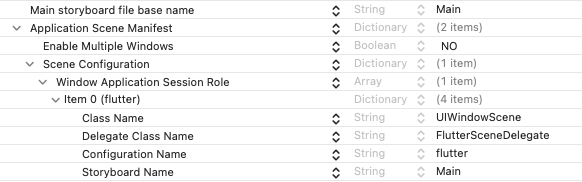
As XML:
```xml title="Info.plist"
UIApplicationSceneManifest
UIApplicationSupportsMultipleScenes
UISceneConfigurations
UIWindowSceneSessionRoleApplication
UISceneClassName
UIWindowScene
UISceneDelegateClassName
FlutterSceneDelegate
UISceneConfigurationName
flutter
UISceneStoryboardFile
Main
```
### Create a SceneDelegate (optional)
If you need access to the `SceneDelegate`,
you can create one by subclassing `FlutterSceneDelegate`:
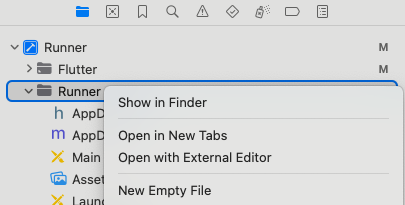
1. Open your app in Xcode.
1. Right-click the **Runner** folder, then select **New Empty File**.
1. Create your `SceneDelegate` class.
For Swift projects,
create a `SceneDelegate.swift` file:
```swift title="my_app/ios/Runner/SceneDelegate.swift"
import Flutter
import UIKit
class SceneDelegate: FlutterSceneDelegate {}
```
For Objective-C projects,
create a `SceneDelegate.h` and a `SceneDelegate.m` file:
```objc title="my_app/ios/Runner/SceneDelegate.h"
#import
#import
@interface SceneDelegate : FlutterSceneDelegate
@end
```
```objc title="my_app/ios/Runner/SceneDelegate.m"
#import "SceneDelegate.h"
@implementation SceneDelegate
@end
```
1. In your `Info.plist` file,
change the **Delegate Class Name** (`UISceneDelegateClassName`) value
from `FlutterSceneDelegate` to your new class.
For Swift projects, use `$(PRODUCT_MODULE_NAME).SceneDelegate`:
```xml title="Info.plist" highlightLines=10-11
UIApplicationSceneManifest
UISceneConfigurations
UIWindowSceneSessionRoleApplication
UISceneDelegateClassName
$(PRODUCT_MODULE_NAME).SceneDelegate
```
For Objective-C projects, use `SceneDelegate`:
```xml title="Info.plist" highlightLines=10-11
UIApplicationSceneManifest
UISceneConfigurations
UIWindowSceneSessionRoleApplication
UISceneDelegateClassName
SceneDelegate
```
## Migrate an add-to-app integration
Similar to the `FlutterAppDelegate`,
the `FlutterSceneDelegate` is recommended but not required.
The `FlutterSceneDelegate` forwards scene callbacks,
such as [`openURL`][], to plugins such as [`local_auth`][].
[`openURL`]: https://developer.apple.com/documentation/uikit/uiapplicationdelegate/1623112-application
[`local_auth`]: https://pub.dev/packages/local_auth
### Create or update a SceneDelegate
```swift diff
import UIKit
+ import Flutter
- class SceneDelegate: UIResponder, UIWindowSceneDelegate {
+ class SceneDelegate: FlutterSceneDelegate {
```
```objc diff
- @interface SceneDelegate : UIResponder
+ @interface SceneDelegate : FlutterSceneDelegate
```
When using Flutter in a SwiftUI app,
you can [optionally use a `FlutterAppDelegate`][flutter-app-delegate]
to receive application events.
To migrate it to receive `UIScene` events,
make the following changes:
1. Set the scene delegate to `FlutterSceneDelegate` in
`application:configurationForConnecting:options:`:
```swift diff
@Observable
class AppDelegate: FlutterAppDelegate {
...
+ override func application(
+ _ application: UIApplication,
+ configurationForConnecting connectingSceneSession: UISceneSession,
+ options: UIScene.ConnectionOptions
+ ) -> UISceneConfiguration {
+ let configuration = UISceneConfiguration(
+ name: nil,
+ sessionRole: connectingSceneSession.role
+ )
+ configuration.delegateClass = FlutterSceneDelegate.self
+ return configuration
+ }
}
```
1. If your app doesn't support multiple scenes,
set **Enable Multiple Scenes** to **NO** under
**Application Scene Manifest** in your target's Info properties.
Multiple-scene support is enabled by default for SwiftUI apps.
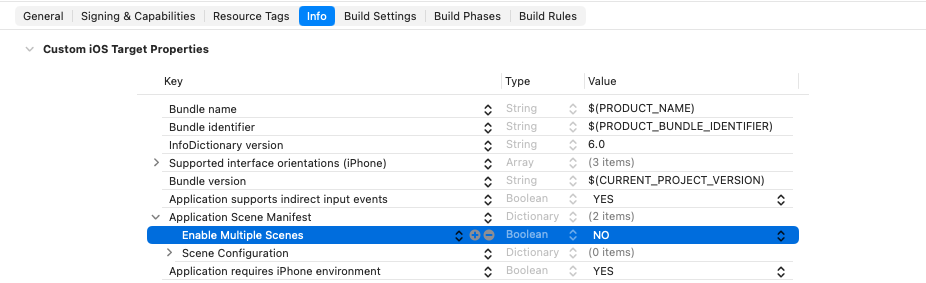
If your app does support multiple scenes,
see [If your app supports multiple scenes][] for further instructions.
[flutter-app-delegate]: /add-to-app/ios/add-flutter-screen#using-the-flutterappdelegate
[If your app supports multiple scenes]: #if-your-app-supports-multiple-scenes
### If you can't subclass FlutterSceneDelegate
If you can't subclass `FlutterSceneDelegate`,
use the `FlutterSceneLifeCycleProvider` protocol and a
`FlutterPluginSceneLifeCycleDelegate` object to
forward scene lifecycle events to Flutter.
```swift title="SceneDelegate.swift" diff
import Flutter
import UIKit
- class SceneDelegate: UIResponder, UIWindowSceneDelegate
+ class SceneDelegate: UIResponder, UIWindowSceneDelegate, FlutterSceneLifeCycleProvider
{
+ var sceneLifeCycleDelegate: FlutterPluginSceneLifeCycleDelegate =
+ FlutterPluginSceneLifeCycleDelegate()
var window: UIWindow?
func scene(
_ scene: UIScene,
willConnectTo session: UISceneSession,
options connectionOptions: UIScene.ConnectionOptions
) {
+ sceneLifeCycleDelegate.scene(
+ scene,
+ willConnectTo: session,
+ options: connectionOptions
+ )
}
func sceneDidDisconnect(_ scene: UIScene) {
+ sceneLifeCycleDelegate.sceneDidDisconnect(scene)
}
func sceneWillEnterForeground(_ scene: UIScene) {
+ sceneLifeCycleDelegate.sceneWillEnterForeground(scene)
}
func sceneDidBecomeActive(_ scene: UIScene) {
+ sceneLifeCycleDelegate.sceneDidBecomeActive(scene)
}
func sceneWillResignActive(_ scene: UIScene) {
+ sceneLifeCycleDelegate.sceneWillResignActive(scene)
}
func sceneDidEnterBackground(_ scene: UIScene) {
+ sceneLifeCycleDelegate.sceneDidEnterBackground(scene)
}
func scene(
_ scene: UIScene,
openURLContexts URLContexts: Set
) {
+ sceneLifeCycleDelegate.scene(scene, openURLContexts: URLContexts)
}
func scene(_ scene: UIScene, continue userActivity: NSUserActivity) {
+ sceneLifeCycleDelegate.scene(scene, continue: userActivity)
}
func windowScene(
_ windowScene: UIWindowScene,
performActionFor shortcutItem: UIApplicationShortcutItem,
completionHandler: @escaping (Bool) -> Void
) {
+ sceneLifeCycleDelegate.windowScene(
+ windowScene,
+ performActionFor: shortcutItem,
+ completionHandler: completionHandler
+ )
}
}
```
```objc title="SceneDelegate.h" diff
- @interface SceneDelegate : UIResponder
+ @interface SceneDelegate : UIResponder
@property(strong, nonatomic) UIWindow* window;
+ @property(nonatomic, strong) FlutterPluginSceneLifeCycleDelegate* sceneLifeCycleDelegate;
@end
```
```objc title="SceneDelegate.m" diff
@implementation SceneDelegate
- (instancetype)init {
if (self = [super init]) {
+ _sceneLifeCycleDelegate = [[FlutterPluginSceneLifeCycleDelegate alloc] init];
}
return self;
}
- (void)scene:(UIScene*)scene
willConnectToSession:(UISceneSession*)session
options:(UISceneConnectionOptions*)connectionOptions {
+ [self.sceneLifeCycleDelegate scene:scene willConnectToSession:session options:connectionOptions];
}
- (void)sceneDidDisconnect:(UIScene*)scene {
+ [self.sceneLifeCycleDelegate sceneDidDisconnect:scene];
}
- (void)sceneDidBecomeActive:(UIScene*)scene {
+ [self.sceneLifeCycleDelegate sceneDidBecomeActive:scene];
}
- (void)sceneWillResignActive:(UIScene*)scene {
+ [self.sceneLifeCycleDelegate sceneWillResignActive:scene];
}
- (void)sceneWillEnterForeground:(UIScene*)scene {
+ [self.sceneLifeCycleDelegate sceneWillEnterForeground:scene];
}
- (void)sceneDidEnterBackground:(UIScene*)scene {
+ [self.sceneLifeCycleDelegate sceneDidEnterBackground:scene];
}
- (void)scene:(UIScene*)scene openURLContexts:(NSSet*)URLContexts {
+ [self.sceneLifeCycleDelegate scene:scene openURLContexts:URLContexts];
}
- (void)scene:(UIScene*)scene continueUserActivity:(NSUserActivity*)userActivity {
+ [self.sceneLifeCycleDelegate scene:scene continueUserActivity:userActivity];
}
- (void)windowScene:(UIWindowScene*)windowScene
performActionForShortcutItem:(UIApplicationShortcutItem*)shortcutItem
completionHandler:(void (^)(BOOL))completionHandler {
+ [self.sceneLifeCycleDelegate windowScene:windowScene
+ performActionForShortcutItem:shortcutItem completionHandler:completionHandler];
}
```
### If your app supports multiple scenes
Flutter doesn't fully support multiple scenes yet,
but support is in progress.
## Migrate a Flutter plugin
Not all plugins use lifecycle events.
However, if your plugin does,
migrate it to UIKit's scene-based lifecycle as follows:
1. Update the Dart and Flutter SDK versions in your `pubspec.yaml`.
The APIs required for this migration are available
starting in Flutter 3.38:
```yaml title="pubspec.yaml"
environment:
sdk: ^3.10.0
flutter: ">=3.38.0"
```
1. Adopt the `FlutterSceneLifeCycleDelegate` protocol.
```swift diff
- public final class MyPlugin: NSObject, FlutterPlugin {
+ public final class MyPlugin: NSObject, FlutterPlugin, FlutterSceneLifeCycleDelegate {
```
```objc diff
- @interface MyPlugin : NSObject
+ @interface MyPlugin : NSObject
```
1. Register the plugin as a receiver of `UISceneDelegate` calls.
To continue supporting apps that haven't yet
migrated to the `UIScene` lifecycle,
consider remaining registered to the application delegate and
keeping the `AppDelegate` events as well.
```swift diff
public static func register(with registrar: FlutterPluginRegistrar) {
...
registrar.addApplicationDelegate(instance)
+ registrar.addSceneDelegate(instance)
}
```
```objc diff
+ (void)registerWithRegistrar:(NSObject *)registrar {
...
[registrar addApplicationDelegate:instance];
+ [registrar addSceneDelegate:instance];
}
```
1. Add the scene events that your plugin needs.
Most `AppDelegate` UI events have a one-to-one replacement,
as shown in the following table.
For details about each event, visit Apple's documentation for
[`UISceneDelegate`][] and [`UIWindowSceneDelegate`][].
| App delegate method | Scene delegate equivalent |
|:------------------------------------------------------------------|:------------------------------------------------------------------|
| [`applicationDidBecomeActive`][] | [`sceneDidBecomeActive`][] |
| [`applicationWillResignActive`][] | [`sceneWillResignActive`][] |
| [`applicationWillEnterForeground`][] | [`sceneWillEnterForeground`][] |
| [`applicationDidEnterBackground`][] | [`sceneDidEnterBackground`][] |
| [`application:continueUserActivity:restorationHandler:`][] | [`scene:continueUserActivity:`][] |
| [`application:performActionForShortcutItem:completionHandler:`][] | [`windowScene:performActionForShortcutItem:completionHandler:`][] |
| [`application:openURL:options:`][] | [`scene:openURLContexts:`][] |
| [`application:willFinishLaunchingWithOptions:`][] | [`scene:willConnectToSession:options:`][] |
| [`application:didFinishLaunchingWithOptions:`][] | [`scene:willConnectToSession:options:`][] |
{:.table}
Once you identify the scene events that replace the
application events your plugin relied on,
implement the corresponding `FlutterSceneLifeCycleDelegate` methods.
The following snippets show the signature of each
scene event that `FlutterSceneLifeCycleDelegate` supports;
implement only the ones your plugin needs.
```swift
public func scene(
_ scene: UIScene,
willConnectTo session: UISceneSession,
options connectionOptions: UIScene.ConnectionOptions?
) -> Bool { }
public func sceneDidDisconnect(_ scene: UIScene) { }
public func sceneWillEnterForeground(_ scene: UIScene) { }
public func sceneDidBecomeActive(_ scene: UIScene) { }
public func sceneWillResignActive(_ scene: UIScene) { }
public func sceneDidEnterBackground(_ scene: UIScene) { }
public func scene(
_ scene: UIScene,
openURLContexts URLContexts: Set
) -> Bool { }
public func scene(
_ scene: UIScene,
continue userActivity: NSUserActivity
) -> Bool { }
public func windowScene(
_ windowScene: UIWindowScene,
performActionFor shortcutItem: UIApplicationShortcutItem,
completionHandler: @escaping (Bool) -> Void
) -> Bool { }
```
```objc
- (BOOL)scene:(UIScene*)scene
willConnectToSession:(UISceneSession*)session
options:(nullable UISceneConnectionOptions*)connectionOptions { }
- (void)sceneDidDisconnect:(UIScene*)scene { }
- (void)sceneWillEnterForeground:(UIScene*)scene { }
- (void)sceneDidBecomeActive:(UIScene*)scene { }
- (void)sceneWillResignActive:(UIScene*)scene { }
- (void)sceneDidEnterBackground:(UIScene*)scene { }
- (BOOL)scene:(UIScene*)scene openURLContexts:(NSSet*)URLContexts { }
- (BOOL)scene:(UIScene*)scene continueUserActivity:(NSUserActivity*)userActivity { }
- (BOOL)windowScene:(UIWindowScene*)windowScene
performActionForShortcutItem:(UIApplicationShortcutItem*)shortcutItem
completionHandler:(void (^)(BOOL succeeded))completionHandler { }
```
1. Move launch logic from `application:willFinishLaunchingWithOptions:`
and `application:didFinishLaunchingWithOptions:` to
`scene:willConnectToSession:options:`.
Although `application:willFinishLaunchingWithOptions:` and
`application:didFinishLaunchingWithOptions:` aren't deprecated,
their launch options are `nil` after you migrate to the `UIScene` lifecycle.
Move any logic that relies on the launch options to the
`scene:willConnectToSession:options:` event.
1. If your plugin uses an API that must be called before
`application:didFinishLaunchingWithOptions:` completes,
you should expose a public method that app developers
can call directly in their AppDelegate.
The following Apple APIs must be configured before app launch finishes:
- [`BGTaskScheduler.registerForTaskWithIdentifier:usingQueue:launchHandler:`][]
- [`UNUserNotificationCenterDelegate`][]
- [`HKHealthStore.enableBackgroundDeliveryForType:frequency:withCompletion:`][]
For example, to support `BGTaskScheduler`:
```swift diff
// Plugin
public class BGTaskPlugin: NSObject, FlutterPlugin {
public static let shared = BGTaskPlugin()
public static func register(with registrar: FlutterPluginRegistrar) {
let channel = ...
registrar.addMethodCallDelegate(shared, channel: channel)
registrar.addApplicationDelegate(shared)
}
+ // A new API for apps to call in their `AppDelegate`'s `application:didFinishLaunchingWithOptions:`
+ public func registerBackgroundHandler(identifier: String) {
+ BGTaskScheduler.register(forTaskWithIdentifier: identifier, using: .main) { task in
+ // Handle background task execution
+ }
+ }
- public func application(_ application: UIApplication, didFinishLaunchingWithOptions launchOptions: [AnyHashable : Any] = [:]) -> Bool {
- BGTaskScheduler.register(forTaskWithIdentifier: identifier, using: .main) { task in
- // Handle background task execution
- }
- return true
- }
}
// App
class AppDelegate: FlutterAppDelegate {
override func application(
_ application: UIApplication,
didFinishLaunchingWithOptions launchOptions: [UIApplication.LaunchOptionsKey: Any]?
) -> Bool {
+ BGTaskPlugin.shared.registerBackgroundHandler(identifier: "com.example.task")
return super.application(application, didFinishLaunchingWithOptions: launchOptions)
}
}
```
```objc diff
// Plugin
@interface BGTaskPlugin : NSObject
+ + (instancetype)sharedInstance;
+ - (void)registerBackgroundHandlerWithIdentifier:(NSString *)identifier;
@end
@implementation BGTaskPlugin
+ + (instancetype)sharedInstance {
+ static BGTaskPlugin *sharedInstance = nil;
+ static dispatch_once_t onceToken;
+ dispatch_once(&onceToken, ^{
+ sharedInstance = [[BGTaskPlugin alloc] init];
+ });
+ return sharedInstance;
+ }
+ (void)registerWithRegistrar:(NSObject *)registrar {
FlutterMethodChannel *channel = ...
[registrar addMethodCallDelegate:[BGTaskPlugin sharedInstance] channel:channel];
[registrar addApplicationDelegate:[BGTaskPlugin sharedInstance]];
}
+ // A new API for apps to call in their `AppDelegate`'s `application:didFinishLaunchingWithOptions:`
+ - (void)registerBackgroundHandlerWithIdentifier:(NSString *)identifier {
+ [[BGTaskScheduler sharedScheduler] registerForTaskWithIdentifier:identifier
+ usingQueue:dispatch_get_main_queue()
+ launchHandler:^(BGTask *task) {
+ // Handle background task execution
+ }];
+ }
- - (BOOL)application:(UIApplication *)application didFinishLaunchingWithOptions:(NSDictionary *)launchOptions {
- [[BGTaskScheduler sharedScheduler] registerForTaskWithIdentifier:identifier
- usingQueue:dispatch_get_main_queue()
- launchHandler:^(BGTask *task) {
- // Handle background task execution
- }];
- return YES;
- }
@end
// App
@implementation AppDelegate
- (BOOL)application:(UIApplication *)application
didFinishLaunchingWithOptions:(NSDictionary *)launchOptions {
+ [[BGTaskPlugin sharedInstance] registerBackgroundHandlerWithIdentifier:@"com.example.task"];
return [super application:application didFinishLaunchingWithOptions:launchOptions];
}
@end
```
This change is required due to UIScene changing the app launch
sequence. For apps that adopt `UIScene`, Flutter calls
`application:willFinishLaunchingWithOptions:` and
`application:didFinishLaunchingWithOptions:` during the
`scene:willConnectToSession:options:` callback.
1. Migrate other deprecated APIs to properly
access the `viewController`, `screen`, or `window`.
| Deprecated API | UIScene replacement |
|:-----------------------------------|:------------------------------|
| [`UIScreen mainScreen`][] | [`UIWindowScene screen`][] |
| [`UIApplication keyWindow`][] | [`UIWindowScene keyWindow`][] |
| [`UIApplication windows`][] | [`UIWindowScene windows`][] |
| [`UIApplicationDelegate window`][] | [`UIView window`][] |
{:.table}
Because `UIApplication.shared.delegate.window` is `nil`
after adopting `UIScene`,
you should access the `viewController`
via the plugin registrar's `viewController` property
and retrieve the window or `windowScene` from there,
as shown in the following examples.
```swift diff
public class MyPlugin: NSObject, FlutterPlugin {
+ var registrar: FlutterPluginRegistrar
+ init(registrar: FlutterPluginRegistrar) {
+ self.registrar = registrar
+ }
public static func register(with registrar: FlutterPluginRegistrar) {
- let instance = MyPlugin()
+ let instance = MyPlugin(registrar: registrar)
}
func someMethod() {
- let screen = UIScreen.main
+ let screen = self.registrar.viewController?.view.window?.windowScene?.screen
- let window = UIApplication.shared.delegate?.window
+ let window = self.registrar.viewController?.view.window
- let keyWindow = UIApplication.shared.keyWindow
+ if #available(iOS 15.0, *) {
+ let keyWindow = self.registrar.viewController?.view.window?.windowScene?.keyWindow
+ } else {
+ let keyWindow = self.registrar.viewController?.view.window?.windowScene?.windows
+ .filter({ $0.isKeyWindow }).first
+ }
- let windows = UIApplication.shared.windows
+ let windows = self.registrar.viewController?.view.window?.windowScene?.windows
}
}
```
```objc diff
@interface MyPlugin ()
+ @property(nonatomic, weak) NSObject *registrar;
+ - (instancetype)initWithRegistrar:(NSObject *)registrar;
@end
@implementation MyPlugin
+ - (instancetype)initWithRegistrar:(NSObject *)registrar {
+ self = [super init];
+ if (self) {
+ _registrar = registrar;
+ }
+ return self;
+ }
+ (void)registerWithRegistrar:(NSObject *)registrar {
- MyPlugin *instance = [[MyPlugin alloc] init];
+ MyPlugin *instance = [[MyPlugin alloc] initWithRegistrar:registrar];
}
- (void)someMethod {
- UIScreen *screen = [UIScreen mainScreen];
+ UIScreen *screen = self.registrar.viewController.view.window.windowScene.screen;
- UIWindow *window = [UIApplication sharedApplication].delegate.window;
+ UIWindow *window = self.registrar.viewController.view.window;
- UIWindow *keyWindow = [[UIApplication sharedApplication] keyWindow];
+ if (@available(iOS 15.0, *)) {
+ UIWindow *keyWindow = self.registrar.viewController.view.window.windowScene.keyWindow;
+ } else {
+ for (UIWindow *window in self.registrar.viewController.view.window.windowScene.windows) {
+ if (window.isKeyWindow) {
+ UIWindow *keyWindow = window;
+ }
+ }
+ }
- NSArray *windows = [UIApplication sharedApplication].windows;
+ NSArray *windows = self.registrar.viewController.view.window.windowScene.windows;
}
```
[`UISceneDelegate`]: https://developer.apple.com/documentation/uikit/uiscenedelegate
[`UIWindowSceneDelegate`]: https://developer.apple.com/documentation/uikit/uiwindowscenedelegate
[`applicationWillResignActive`]: https://developer.apple.com/documentation/uikit/uiapplicationdelegate/1622950-applicationwillresignactive
[`applicationWillEnterForeground`]: https://developer.apple.com/documentation/uikit/uiapplicationdelegate/1623076-applicationwillenterforeground
[`applicationDidEnterBackground`]: https://developer.apple.com/documentation/uikit/uiapplicationdelegate/1622997-applicationdidenterbackground
[`application:continueUserActivity:restorationHandler:`]: https://developer.apple.com/documentation/uikit/uiapplicationdelegate/1623072-application
[`application:performActionForShortcutItem:completionHandler:`]: https://developer.apple.com/documentation/uikit/uiapplicationdelegate/application(_:performactionfor:completionhandler:)
[`application:openURL:options:`]: https://developer.apple.com/documentation/uikit/uiapplicationdelegate/1623112-application
[`application:willFinishLaunchingWithOptions:`]: https://developer.apple.com/documentation/uikit/uiapplicationdelegate/1623032-application
[`application:didFinishLaunchingWithOptions:`]: https://developer.apple.com/documentation/uikit/uiapplicationdelegate/1622921-application
[`sceneDidBecomeActive`]: https://developer.apple.com/documentation/uikit/uiscenedelegate/3197915-scenedidbecomeactive
[`sceneWillResignActive`]: https://developer.apple.com/documentation/uikit/uiscenedelegate/3197919-scenewillresignactive
[`sceneWillEnterForeground`]: https://developer.apple.com/documentation/uikit/uiscenedelegate/3197918-scenewillenterforeground
[`sceneDidEnterBackground`]: https://developer.apple.com/documentation/uikit/uiscenedelegate/3197917-scenedidenterbackground
[`scene:continueUserActivity:`]: https://developer.apple.com/documentation/uikit/uiscenedelegate/scene(_:continue:)
[`windowScene:performActionForShortcutItem:completionHandler:`]: https://developer.apple.com/documentation/uikit/uiwindowscenedelegate/3238088-windowscene
[`scene:openURLContexts:`]: https://developer.apple.com/documentation/uikit/uiscenedelegate/3238059-scene
[`scene:willConnectToSession:options:`]: https://developer.apple.com/documentation/uikit/uiscenedelegate/3197914-scene
[`UIScreen mainScreen`]: https://developer.apple.com/documentation/uikit/uiscreen/1617815-mainscreen
[`UIWindowScene screen`]: https://developer.apple.com/documentation/uikit/uiwindowscene/screen?language=objc
[`UIApplication keyWindow`]: https://developer.apple.com/documentation/uikit/uiapplication/1622924-keywindow
[`UIWindowScene keyWindow`]: https://developer.apple.com/documentation/uikit/uiwindowscene/keywindow?language=objc
[`UIApplication windows`]: https://developer.apple.com/documentation/uikit/uiapplication/windows
[`UIWindowScene windows`]: https://developer.apple.com/documentation/uikit/uiwindowscene/windows?language=objc
[`UIApplicationDelegate window`]: https://developer.apple.com/documentation/uikit/uiapplicationdelegate/window
[`UIView window`]: https://developer.apple.com/documentation/uikit/uiview/window?language=objc
[`BGTaskScheduler.registerForTaskWithIdentifier:usingQueue:launchHandler:`]:
[`UNUserNotificationCenterDelegate`]: https://developer.apple.com/documentation/usernotifications/unusernotificationcenterdelegate?language=objc
[`HKHealthStore.enableBackgroundDeliveryForType:frequency:withCompletion:`]:
## Bespoke FlutterViewController usage
If your app instantiates a `FlutterViewController` from
storyboards in `application:didFinishLaunchingWithOptions:` for
reasons other than creating platform channels,
you must accommodate the new initialization order.
To do so, use one of the following migration options:
- Subclass `FlutterViewController` and put the logic in
the subclass's `awakeFromNib` method.
- Specify a `UISceneDelegate` in the `Info.plist` or
in the `UIApplicationDelegate`, and
put the logic in `scene:willConnectToSession:options:`.
To learn more, check out [Apple's documentation][apple-delegate-docs].
[apple-delegate-docs]: https://developer.apple.com/documentation/uikit/specifying-the-scenes-your-app-supports
### Example
```swift
@objc class MyViewController: FlutterViewController {
override func awakeFromNib() {
super.awakeFromNib()
doSomethingWithFlutterViewController(self)
}
}
```
## Hide migration warning
To hide the Flutter CLI warning about migrating to `UIScene`,
add the following to your `pubspec.yaml`:
```yaml title="pubspec.yaml" diff
flutter:
config:
+ enable-uiscene-migration: false
```
## Temporarily disable UIScene
To _temporarily_ disable `UIScene` support, add an underscore (`_`)
in front of **Application Scene Manifest** in your `Info.plist`:

When you're ready to re-enable `UIScene` support, remove the underscore.
## Timeline
Landed in version: 3.38.0-0.1.pre
In stable release: 3.38
Apple hasn't yet announced when it will enforce the `UIScene` requirement.
Once Apple changes its warning to an assertion,
Flutter apps that haven't adopted the `UIScene` lifecycle will
crash on startup when built with the latest SDK.
## References
- [Issue 167267][]: The initial reported issue.
[Issue 167267]: https://github.com/flutter/flutter/issues/167267