# Web support for Flutter
> Details of how Flutter supports the creation of web experiences.
Flutter delivers the same experiences on the web as on mobile.
Building on the portability of Dart, the power of the web platform,
the flexibility of the Flutter framework, and the performance of WebAssembly,
you can build apps for iOS, Android, and the browser from the same codebase.
The web is just another device target for your app.
To get started, visit [Building a web application with Flutter][].
## Powered by WebAssembly
Dart and Flutter can compile to WebAssembly,
a binary instruction format that enables fast apps on all major browsers.
For a glimpse into the benefits of using WebAssembly,
check out the following video.
## How it works
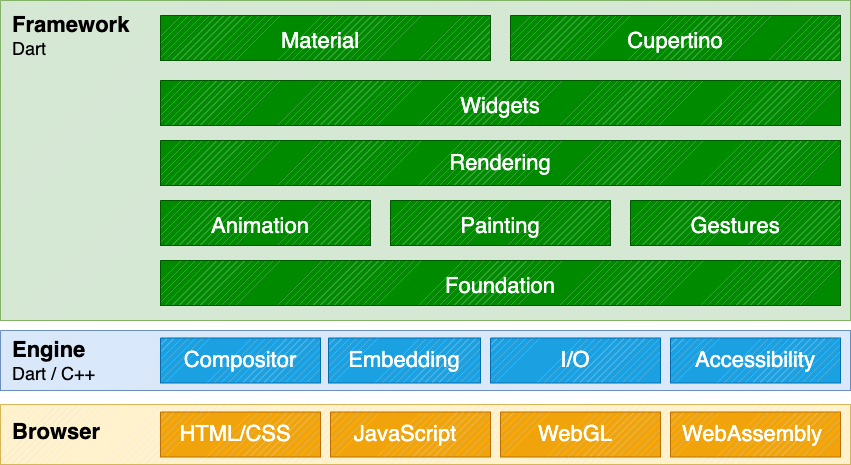
Adding web support to Flutter involved implementing Flutter's
core drawing layer on top of standard browser APIs,
in addition to compiling Dart to JavaScript,
instead of the ARM machine code that
is used for mobile applications.
Using a combination of DOM, Canvas, and WebAssembly,
Flutter can provide a portable, high-quality,
and performant user experience across modern browsers.
We implemented the core drawing layer completely in Dart
and used Dart's optimized JavaScript compiler to compile the
Flutter core and framework along with your application into a single,
minified source file that can be deployed to any web server.
 ## What types of apps can I build?
While you can do a lot on the web,
Flutter's web support is most valuable in the
following scenarios:
**Single Page Application**
: Flutter's web support enables complex standalone web apps that are rich with
graphics and interactive content to reach end users on a wide variety of
devices.
**Existing mobile applications**
: Web support for Flutter provides a browser-based delivery model for existing
Flutter mobile apps.
Not every HTML scenario is ideally suited for Flutter at this time.
For example, text-rich, flow-based, static content such as blog articles
benefit from the document-centric model that the web is built around,
rather than the app-centric services that a UI framework like Flutter
can deliver. However, you _can_ use Flutter to embed interactive
experiences into these websites.
However, if you want to use Dart and wish to implement a traditional
DOM-based website, a community-released Dart package,
[Jaspr][], supports static websites; in fact,
the [Dart documentation][] and [Flutter documentation][]
and [marketing][] websites were migrated to use the Jaspr package.
Note that Jaspr uses Dart (but not Flutter), and makes SEO work in the same
way a traditional website would.
[Dart documentation]: https://dart.dev
[Flutter documentation]: https://flutter.dev
[Jaspr]: https://jaspr.site/
[marketing]: https://flutter.dev
## Get started
The following resources can help you get started:
* To add web support to an existing app, or to create a
new app that includes web support,
visit [Building a web application with Flutter][].
* To configure web development server settings in a centralized file,
check out [Set up a web development configuration file][].
* To learn about Flutter's different web renderers (CanvasKit and Skwasm),
check out [Web renderers][].
* To learn how to create a responsive Flutter
app, check out [Creating responsive apps][].
* To view commonly asked questions and answers,
visit the [web FAQ][].
* For code examples,
check out the [web samples for Flutter][].
* For a Flutter web app demo, check out the [Wonderous app][].
* To learn about deploying a web app,
visit [Preparing an app for web release][].
* [File an issue][] on the main Flutter repo.
* You can chat and ask web-related questions on the
**#help** channel on [Discord][].
[Building a web application with Flutter]: /platform-integration/web/building
[Set up a web development configuration file]: /platform-integration/web/web-dev-config-file
[Creating responsive apps]: /ui/adaptive-responsive
[Discord]: https://discordapp.com/invite/yeZ6s7k
[file an issue]: https://goo.gle/flutter_web_issue
[Wonderous app]: https://wonderous.app//web
[Preparing an app for web release]: /deployment/web
[Progressive Web Application]: https://web.dev/progressive-web-apps/
[web FAQ]: /platform-integration/web/faq
[web samples for Flutter]: https://github.com/flutter/samples/#?platform=web
[Web renderers]: /platform-integration/web/renderers
## What types of apps can I build?
While you can do a lot on the web,
Flutter's web support is most valuable in the
following scenarios:
**Single Page Application**
: Flutter's web support enables complex standalone web apps that are rich with
graphics and interactive content to reach end users on a wide variety of
devices.
**Existing mobile applications**
: Web support for Flutter provides a browser-based delivery model for existing
Flutter mobile apps.
Not every HTML scenario is ideally suited for Flutter at this time.
For example, text-rich, flow-based, static content such as blog articles
benefit from the document-centric model that the web is built around,
rather than the app-centric services that a UI framework like Flutter
can deliver. However, you _can_ use Flutter to embed interactive
experiences into these websites.
However, if you want to use Dart and wish to implement a traditional
DOM-based website, a community-released Dart package,
[Jaspr][], supports static websites; in fact,
the [Dart documentation][] and [Flutter documentation][]
and [marketing][] websites were migrated to use the Jaspr package.
Note that Jaspr uses Dart (but not Flutter), and makes SEO work in the same
way a traditional website would.
[Dart documentation]: https://dart.dev
[Flutter documentation]: https://flutter.dev
[Jaspr]: https://jaspr.site/
[marketing]: https://flutter.dev
## Get started
The following resources can help you get started:
* To add web support to an existing app, or to create a
new app that includes web support,
visit [Building a web application with Flutter][].
* To configure web development server settings in a centralized file,
check out [Set up a web development configuration file][].
* To learn about Flutter's different web renderers (CanvasKit and Skwasm),
check out [Web renderers][].
* To learn how to create a responsive Flutter
app, check out [Creating responsive apps][].
* To view commonly asked questions and answers,
visit the [web FAQ][].
* For code examples,
check out the [web samples for Flutter][].
* For a Flutter web app demo, check out the [Wonderous app][].
* To learn about deploying a web app,
visit [Preparing an app for web release][].
* [File an issue][] on the main Flutter repo.
* You can chat and ask web-related questions on the
**#help** channel on [Discord][].
[Building a web application with Flutter]: /platform-integration/web/building
[Set up a web development configuration file]: /platform-integration/web/web-dev-config-file
[Creating responsive apps]: /ui/adaptive-responsive
[Discord]: https://discordapp.com/invite/yeZ6s7k
[file an issue]: https://goo.gle/flutter_web_issue
[Wonderous app]: https://wonderous.app//web
[Preparing an app for web release]: /deployment/web
[Progressive Web Application]: https://web.dev/progressive-web-apps/
[web FAQ]: /platform-integration/web/faq
[web samples for Flutter]: https://github.com/flutter/samples/#?platform=web
[Web renderers]: /platform-integration/web/renderers