# Concurrency and isolates
> Multithreading in Flutter using Dart isolates.
All Dart code runs in [isolates](https://dart.dev/language/concurrency),
which are similar to threads,
but differ in that isolates have their own isolated memory.
They do not share state in any way,
and can only communicate by messaging.
By default,
Flutter apps do all of their work on a single isolate –
the main isolate.
In most cases, this model allows for simpler programming and
is fast enough that the application's UI doesn't become unresponsive.
Sometimes though,
applications need to perform exceptionally large computations
that can cause "UI jank" (jerky motion).
If your app is experiencing jank for this reason,
you can move these computations to a helper isolate.
This allows the underlying runtime environment
to run the computation concurrently
with the main UI isolate's work
and takes advantage of multi-core devices.
Each isolate has its own memory
and its own event loop.
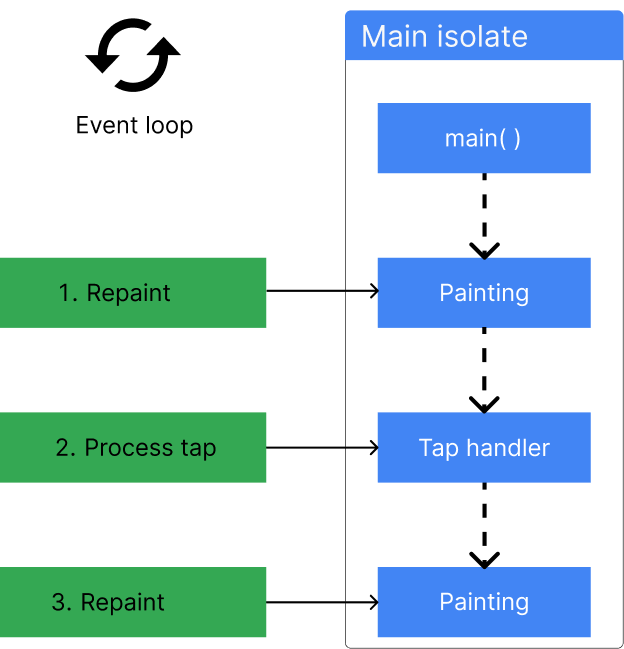
The event loop processes
events in the order that they're added to an event queue.
On the main isolate,
these events can be anything from handling a user tapping in the UI,
to executing a function,
to painting a frame on the screen.
The following figure shows an example event queue
with 3 events waiting to be processed.
{:width="50%" .diagram-wrap}
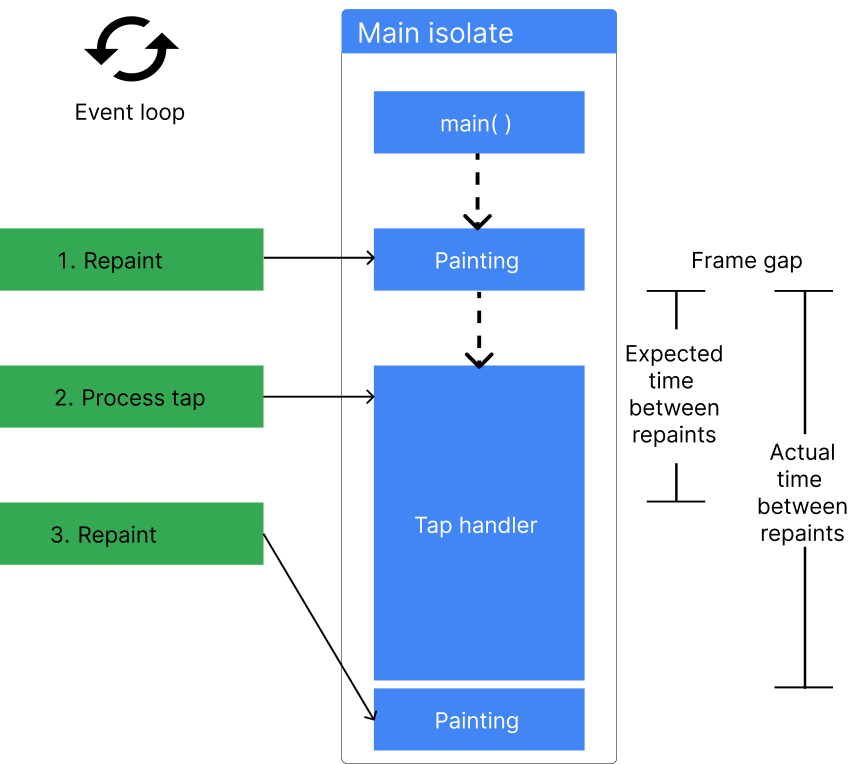
For smooth rendering,
Flutter adds a "paint frame" event to the event queue
60 times per second(for a 60Hz device).
If these events aren't processed on time,
the application experiences UI jank,
or worse,
become unresponsive altogether.
{:width="60%" .diagram-wrap}
Whenever a process can't be completed in a frame gap,
the time between two frames,
it's a good idea to offload the work to another isolate
to ensure that the main isolate can produce 60 frames per second.
When you spawn an isolate in Dart,
it can process the work concurrently with the main isolate,
without blocking it.
You can read more about how isolates
and the event loop work in Dart on
the [concurrency page][] of the Dart
documentation.
[concurrency page]: https://dart.dev/language/concurrency
## Common use cases for isolates
There is only one hard rule for when you should use isolates,
and that's when large computations are causing your Flutter application
to experience UI jank.
This jank happens when there is any computation that takes longer than
Flutter's frame gap.
{:width="60%" .diagram-wrap}
Any process _could_ take longer to complete,
depending on the implementation
and the input data,
making it impossible to create an exhaustive list of
when you need to consider using isolates.
That said, isolates are commonly used for the following:
- Reading data from a local database
- Sending push notifications
- Parsing and decoding large data files
- Processing or compressing photos, audio files, and video files
- Converting audio and video files
- When you need asynchronous support while using FFI
- Applying filtering to complex lists or filesystems
## Message passing between isolates
Dart's isolates are an implementation of the [Actor model][].
They can only communicate with each other by message passing,
which is done with [`Port` objects][].
When messages are "passed" between each other,
they are generally copied from the sending isolate to the
receiving isolate.
This means that any value passed to an isolate,
even if mutated on that isolate,
doesn't change the value on the original isolate.
The only [objects that aren't copied when passed][] to an isolate
are immutable objects that can't be changed anyway,
such a String or an unmodifiable byte.
When you pass an immutable object between isolates,
a reference to that object is sent across the port,
rather than the object being copied,
for better performance.
Because immutable objects can't be updated,
this effectively retains the actor model behavior.
[`Port` objects]: https://api.dart.dev/dart-isolate/ReceivePort-class.html
[objects that aren't copied when passed]: https://api.dart.dev/dart-isolate/SendPort/send.html
An exception to this rule is
when an isolate exits when it sends a message using the `Isolate.exit` method.
Because the sending isolate won't exist after sending the message,
it can pass ownership of the message from one isolate to the other,
ensuring that only one isolate can access the message.
The two lowest-level primitives that send messages are `SendPort.send`,
which makes a copy of a mutable message as it sends,
and `Isolate.exit`,
which sends the reference to the message.
Both `Isolate.run` and `compute`
use `Isolate.exit` under the hood.
## Short-lived isolates
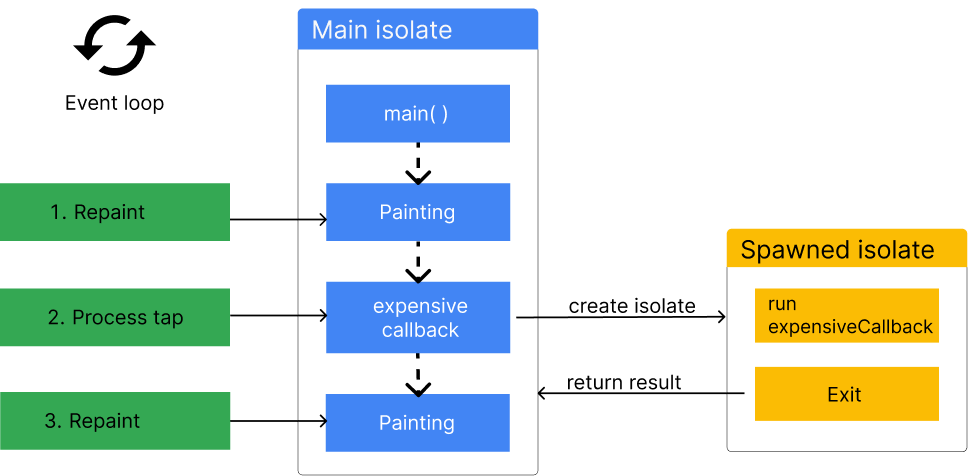
The easiest way to move a process to an isolate in Flutter is with
the `Isolate.run` method.
This method spawns an isolate,
passes a callback to the spawned isolate to start some computation,
returns a value from the computation,
and then shuts the isolate down when the computation is complete.
This all happens concurrently with the main isolate,
and doesn't block it.
{:width="70%" .diagram-wrap}
The `Isolate.run` method requires a single argument,
a callback function,
that is run on the new isolate.
This callback's function signature must have exactly
one required, unnamed argument.
When the computation completes,
it returns the callback's value back to the main isolate,
and exits the spawned isolate.
For example,
consider this code that loads a large JSON blob from a file,
and converts that JSON into custom Dart objects.
If the json decoding process wasn't off loaded to a new isolate,
this method would cause the UI to
become unresponsive for several seconds.
```dart
// Produces a list of 211,640 photo objects.
// (The JSON file is ~20MB.)
Future> getPhotos() async {
final String jsonString = await rootBundle.loadString('assets/photos.json');
final List photos = await Isolate.run>(() {
final List photoData = jsonDecode(jsonString) as List;
return photoData.cast>().map(Photo.fromJson).toList();
});
return photos;
}
```
For a complete walkthrough of using Isolates to
parse JSON in the background, see [this cookbook recipe][].
[this cookbook recipe]: /cookbook/networking/background-parsing
## Stateful, longer-lived isolates
Short-live isolates are convenient to use,
but there is performance overhead required to spawn new isolates,
and to copy objects from one isolate to another.
If you're doing the same computation using `Isolate.run` repeatedly,
you might have better performance by creating isolates that don't exit immediately.
To do this, you can use a handful of lower-level isolate-related APIs that
`Isolate.run` abstracts:
- [`Isolate.spawn()`][] and [`Isolate.exit()`][]
- [`ReceivePort`][] and [`SendPort`][]
- [`send()`][] method
When you use the `Isolate.run` method,
the new isolate immediately shuts down after it
returns a single message to the main isolate.
Sometimes, you'll need isolates that are long lived,
and can pass multiple messages to each other over time.
In Dart, you can accomplish this with the Isolate API
and Ports.
These long-lived isolates are colloquially known as _background workers_.
Long-lived isolates are useful when you have a specific process that either
needs to be run repeatedly throughout the lifetime of your application,
or if you have a process that runs over a period of time
and needs to yield multiple return values to the main isolate.
Or, you might use [worker_manager][] to manage long-lived isolates.
[worker_manager]: https://pub.dev/packages/worker_manager
### ReceivePorts and SendPorts
Set up long-lived communication between isolates with two classes
(in addition to Isolate):
[`ReceivePort`][] and [`SendPort`][].
These ports are the only way isolates can communicate with each other.
`Ports` behave similarly to `Streams`,
in which the `StreamController`
or `Sink` is created in one isolate,
and the listener is set up in the other isolate.
In this analogy,
the `StreamController` is called a `SendPort`,
and you can "add" messages with the `send()` method.
`ReceivePort`s are the listeners,
and when these listeners receive a new message,
they call a provided callback with the message as an argument.
For an in-depth explanation on setting up two-way
communication between the main isolate
and a worker isolate,
follow the examples in the [Dart documentation][].
[Dart documentation]: https://dart.dev/language/concurrency
## Using platform plugins in isolates
You can use platform plugins in background isolates.
This enables plugins to offload heavy, platform-dependent
computations to an isolate that won't block your UI.
For example, imagine you're encrypting data using a native host API
(such as an Android API on Android, an iOS API on iOS, and so on).
Previously, [marshaling data][] to the host platform could waste UI thread time,
and can now be done in a background isolate.
Platform channel isolates use the [`BackgroundIsolateBinaryMessenger`][] API.
The following snippet shows an example of using
the `shared_preferences` package in a background isolate.
```dart
import 'dart:isolate';
import 'package:flutter/services.dart';
import 'package:shared_preferences/shared_preferences.dart';
void main() {
// Identify the root isolate to pass to the background isolate.
RootIsolateToken rootIsolateToken = RootIsolateToken.instance!;
Isolate.spawn(_isolateMain, rootIsolateToken);
}
Future _isolateMain(RootIsolateToken rootIsolateToken) async {
// Register the background isolate with the root isolate.
BackgroundIsolateBinaryMessenger.ensureInitialized(rootIsolateToken);
// You can now use the shared_preferences plugin.
SharedPreferences sharedPreferences = await SharedPreferences.getInstance();
print(sharedPreferences.getBool('isDebug'));
}
```
## Limitations of Isolates
If you're coming to Dart from a language with multithreading,
it's reasonable to expect isolates to behave like threads,
but that isn't the case.
Isolates have their own global fields,
and can only communicate with message passing,
ensuring that mutable objects in an isolate are only ever accessible
in a single isolate.
Therefore, isolates are limited by their access to their own memory.
For example,
if you have an application with a global mutable variable called `configuration`,
it is copied as a new global field in a spawned isolate.
If you mutate that variable in the spawned isolate,
it remains untouched in the main isolate.
This is true even if you pass the `configuration` object as a message
to the new isolate.
This is how isolates are meant to function,
and it's important to keep in mind when you consider using isolates.
### Web platforms and compute
Dart web platforms, including Flutter web,
don't support isolates.
If you're targeting the web with your Flutter app,
you can use the `compute` method to ensure your code compiles.
The [`compute()`][] method runs the computation on
the main thread on the web,
but spawns a new thread on mobile devices.
On mobile and desktop platforms
`await compute(fun, message)`
is equivalent to `await Isolate.run(() => fun(message))`.
For more information on concurrency on the web,
check out the [concurrency documentation][] on dart.dev.
[concurrency documentation]: https://dart.dev/language/concurrency
### No `rootBundle` access or `dart:ui` methods
All UI tasks and Flutter itself are coupled to the main isolate.
Therefore,
you can't access assets using `rootBundle` in spawned isolates,
nor can you perform any widget
or UI work in spawned isolates.
### Limited plugin messages from host platform to Flutter
With background isolate platform channels,
you can use platform channels in isolates to send messages to the host platform
(for example Android or iOS),
and receive responses to those messages.
However, you can't receive unsolicited messages from the host platform.
As an example,
you can't set up a long-lived Firestore listener in a background isolate,
because Firestore uses platform channels to push updates to Flutter,
which are unsolicited.
You can, however, query Firestore for a response in the background.
## More information
For more information on isolates, check out the following resources:
- If you're using many isolates, consider the [IsolateNameServer][] class in Flutter,
or the pub package that clones the functionality for Dart applications not using
Flutter.
- Dart's Isolates are an implementation of the [Actor model][].
- [isolate_agents][] is a package that abstracts Ports and make it easier to create long-lived isolates.
- Read more about the `BackgroundIsolateBinaryMessenger` API [announcement][].
[announcement]: https://blog.flutter.dev/introducing-background-isolate-channels-7a299609cad8
[Actor model]: https://en.wikipedia.org/wiki/Actor_model
[isolate_agents]: https://medium.com/@gaaclarke/isolate-agents-easy-isolates-for-flutter-6d75bf69a2e7
[marshaling data]: https://en.wikipedia.org/wiki/Marshalling_(computer_science)
[`compute()`]: https://api.flutter.dev/flutter/foundation/compute.html
[`Isolate.spawn()`]: https://api.dart.dev/dart-isolate/Isolate/spawn.html
[`Isolate.exit()`]: https://api.dart.dev/dart-isolate/Isolate/exit.html
[`ReceivePort`]: https://api.dart.dev/dart-isolate/ReceivePort-class.html
[`SendPort`]: https://api.dart.dev/dart-isolate/SendPort-class.html
[`send()`]: https://api.dart.dev/dart-isolate/SendPort/send.html
[`BackgroundIsolateBinaryMessenger`]: https://api.flutter.dev/flutter/services/BackgroundIsolateBinaryMessenger-class.html
[IsolateNameServer]: https://api.flutter.dev/flutter/dart-ui/IsolateNameServer-class.html