# Persistent storage architecture: SQL
> Save complex application data to a user's device with SQL.
Most Flutter applications,
no matter how small or big they are,
might require storing data on the user’s device at some point.
For example, API keys,
user preferences or data that should be available offline.
In this recipe,
you will learn how to integrate persistent storage for complex data using SQL
in a Flutter application following the Flutter Architecture design pattern.
To learn how to store simpler key-value data,
take a look at the Cookbook recipe:
[Persistent storage architecture: Key-value data][].
To read this recipe,
you should be familiar with SQL and SQLite.
If you need help, you can read the [Persist data with SQLite][] recipe
before reading this one.
This example uses [`sqflite`][] with the [`sqflite_common_ffi`][] plugin,
which combined support for mobile and desktop.
Support for web is provided in the experimental plugin
[`sqflite_common_ffi_web`][] but it's not included in this example.
## Example application: ToDo list application
The example application consists of a single screen with an app bar at the top,
a list of items, and a text field input at the bottom.
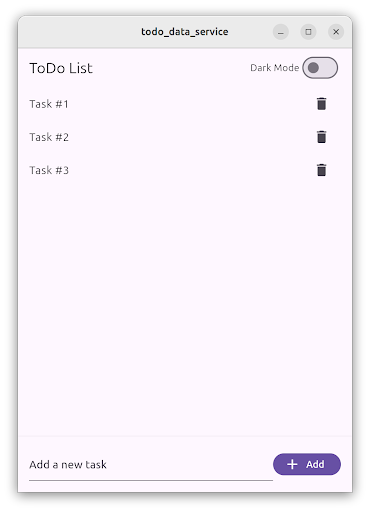 The body of the application contains the `TodoListScreen`.
This screen contains a `ListView` of `ListTile` items,
each one representing a ToDo item.
At the bottom, a `TextField` allows users to create new ToDo items
by writing the task description and then tapping on the “Add” `FilledButton`.
Users can tap on the delete `IconButton` to delete the ToDo item.
The list of ToDo items is stored locally using a database service,
and restored when the user starts the application.
:::note
The full, runnable source-code for this example is
available in [`/examples/app-architecture/todo_data_service/`][].
:::
## Storing complex data with SQL
This functionality follows the recommended [Flutter Architecture design][],
containing a UI layer and a data layer.
Additionally, in the domain layer you will find the data model used.
- UI layer with `TodoListScreen` and `TodoListViewModel`
- Domain layer with `Todo` data class
- Data layer with `TodoRepository` and `DatabaseService`
### ToDo list presentation layer
The `TodoListScreen` is a Widget that contains the UI in charge of displaying
and creating the ToDo items.
It follows the [MVVM pattern][]
and is accompanied by the `TodoListViewModel`,
which contains the list of ToDo items
and three commands to load, add, and delete ToDo items.
This screen is divided into two parts,
one containing the list of ToDo items,
implemented using a `ListView`,
and the other is a `TextField`
and a `Button`, used for creating new ToDo items.
The `ListView` is wrapped by a `ListenableBuilder`,
which listens to changes in the `TodoListViewModel`,
and shows a `ListTile` for each ToDo item.
```dart
ListenableBuilder(
listenable: widget.viewModel,
builder: (context, child) {
return ListView.builder(
itemCount: widget.viewModel.todos.length,
itemBuilder: (context, index) {
final todo = widget.viewModel.todos[index];
return ListTile(
title: Text(todo.task),
trailing: IconButton(
icon: const Icon(Icons.delete),
onPressed: () => widget.viewModel.delete.execute(todo.id),
),
);
},
);
},
)
```
The list of ToDo items is defined in the `TodoListViewModel`,
and loaded by the `load` command.
This method calls the `TodoRepository` and fetches the list of ToDo items.
```dart
List _todos = [];
List get todos => _todos;
Future> _load() async {
try {
final result = await _todoRepository.fetchTodos();
switch (result) {
case Ok>():
_todos = result.value;
return Result.ok(null);
case Error():
return Result.error(result.error);
}
} on Exception catch (e) {
return Result.error(e);
} finally {
notifyListeners();
}
}
```
Pressing the `FilledButton`,
executes the `add` command
and passes in the text controller value.
```dart
FilledButton.icon(
onPressed: () =>
widget.viewModel.add.execute(_controller.text),
label: const Text('Add'),
icon: const Icon(Icons.add),
)
```
The `add` command then calls the `TodoRepository.createTodo()` method
with the task description text and it creates a new ToDo item.
The `createTodo()` method returns the newly created ToDo,
which is then added to the `_todo` list in the view model.
ToDo items contain a unique identifier generated by the database.
This is why the view model doesn’t create the ToDo item,
but rather the `TodoRepository` does.
```dart
Future> _add(String task) async {
try {
final result = await _todoRepository.createTodo(task);
switch (result) {
case Ok():
_todos.add(result.value);
return Result.ok(null);
case Error():
return Result.error(result.error);
}
} on Exception catch (e) {
return Result.error(e);
} finally {
notifyListeners();
}
}
```
Finally, the `TodoListScreen` also listens to the result in the `add` command.
When the action completes, the `TextEditingController` is cleared.
```dart
void _onAdd() {
// Clear the text field when the add command completes.
if (widget.viewModel.add.completed) {
widget.viewModel.add.clearResult();
_controller.clear();
}
}
```
When a user taps on the `IconButton` in the `ListTile`, the delete command is executed.
```dart
IconButton(
icon: const Icon(Icons.delete),
onPressed: () => widget.viewModel.delete.execute(todo.id),
)
```
Then, the view model calls the `TodoRepository.deleteTodo()` method,
passing the unique ToDo item identifier.
A correct result removes the ToDo item from the view
model *and* the screen.
```dart
Future> _delete(int id) async {
try {
final result = await _todoRepository.deleteTodo(id);
switch (result) {
case Ok():
_todos.removeWhere((todo) => todo.id == id);
return Result.ok(null);
case Error():
return Result.error(result.error);
}
} on Exception catch (e) {
return Result.error(e);
} finally {
notifyListeners();
}
}
```
### Todo list domain layer
The domain layer of this example application contains
the `Todo` item data model.
Items are presented by an immutable data class.
In this case, the application uses the `freezed` package to generate the code.
The class has two properties, an ID represented by an `int`,
and a task description, represented by a `String`.
```dart
@freezed
abstract class Todo with _$Todo {
const factory Todo({
/// The unique identifier of the Todo item.
required int id,
/// The task description of the Todo item.
required String task,
}) = _Todo;
}
```
### Todo list data layer
The data layer of this functionality is composed of two classes,
the `TodoRepository` and the `DatabaseService`.
The `TodoRepository` acts as the source of truth for all the ToDo items.
View models must use this repository to access to the ToDo list,
and it should not expose any implementation details on how they are stored.
Internally, the `TodoRepository` uses the `DatabaseService`,
which implements the access to the SQL database using the `sqflite` package.
You can implement the same `DatabaseService` using other storage packages
like `sqlite3`, `drift` or even cloud storage solutions like `firebase_database`.
The `TodoRepository` checks if the database is open
before every request and opens it if necessary.
It implements the `fetchTodos()`, `createTodo()`, and `deleteTodo()` methods.
```dart
class TodoRepository {
TodoRepository({required this._database});
final DatabaseService _database;
Future>> fetchTodos() async {
if (!_database.isOpen()) {
await _database.open();
}
return _database.getAll();
}
Future> createTodo(String task) async {
if (!_database.isOpen()) {
await _database.open();
}
return _database.insert(task);
}
Future> deleteTodo(int id) async {
if (!_database.isOpen()) {
await _database.open();
}
return _database.delete(id);
}
}
```
The `DatabaseService` implements the access to the SQLite database
using the `sqflite` package.
It’s a good idea to define the table and column names as constants
to avoid typos when writing SQL code.
```dart
static const String _todoTableName = 'todo';
static const String _idColumnName = '_id';
static const String _taskColumnName = 'task';
```
The `open()` method opens the existing database,
or creates a new one if it doesn’t exist.
```dart
Future open() async {
_database = await databaseFactory.openDatabase(
join(await databaseFactory.getDatabasesPath(), 'app_database.db'),
options: OpenDatabaseOptions(
onCreate: (db, version) {
return db.execute(
'CREATE TABLE $_todoTableName($_idColumnName INTEGER PRIMARY KEY AUTOINCREMENT, $_taskColumnName TEXT)',
);
},
version: 1,
),
);
}
```
Note that the column `id` is set as `primary key` and `autoincrement`;
this means that each newly inserted item
is assigned a new value for the `id` column.
The `insert()` method creates a new ToDo item in the database,
and returns a newly created Todo instance.
The `id` is generated as mentioned before.
```dart
Future> insert(String task) async {
try {
final id = await _database!.insert(_todoTableName, {
_taskColumnName: task,
});
return Result.ok(Todo(id: id, task: task));
} on Exception catch (e) {
return Result.error(e);
}
}
```
All the `DatabaseService` operations use the `Result` class to return a value,
as recommended by the [Flutter architecture recommendations][].
This facilitates handling errors in further steps in the application code.
The `getAll()` method performs a database query,
obtaining all the values in the `id` and `task` columns.
For each entry, it creates a `Todo` class instance.
```dart
Future>> getAll() async {
try {
final entries = await _database!.query(
_todoTableName,
columns: [_idColumnName, _taskColumnName],
);
final list = entries
.map(
(element) => Todo(
id: element[_idColumnName] as int,
task: element[_taskColumnName] as String,
),
)
.toList();
return Result.ok(list);
} on Exception catch (e) {
return Result.error(e);
}
}
```
The `delete()` method performs a database delete operation
based on the ToDo item `id`.
In this case, if no items were deleted an error is returned,
indicating that something went wrong.
```dart
Future> delete(int id) async {
try {
final rowsDeleted = await _database!.delete(
_todoTableName,
where: '$_idColumnName = ?',
whereArgs: [id],
);
if (rowsDeleted == 0) {
return Result.error(Exception('No todo found with id $id'));
}
return Result.ok(null);
} on Exception catch (e) {
return Result.error(e);
}
}
```
:::note
In some cases, you might want to close the database when you are done with it.
For example, when the user leaves the screen,
or after a certain time has passed.
This depends on the database implementation
as well as your application requirements.
It’s recommended that you check with the database package authors
for recommendations.
:::
## Putting it all together
In the `main()` method of your application,
first initialize the `DatabaseService`,
which requires different initialization code on different platforms.
Then, pass the newly created `DatabaseService` into the `TodoRepository`
which is itself passed into the `MainApp` as a constructor argument dependency.
```dart
void main() {
late DatabaseService databaseService;
if (kIsWeb) {
throw UnsupportedError('Platform not supported');
} else if (Platform.isLinux || Platform.isWindows || Platform.isMacOS) {
// Initialize FFI SQLite
sqfliteFfiInit();
databaseService = DatabaseService(databaseFactory: databaseFactoryFfi);
} else {
// Use default native SQLite
databaseService = DatabaseService(databaseFactory: databaseFactory);
}
runApp(
MainApp(
// ···
todoRepository: TodoRepository(database: databaseService),
),
);
}
```
Then, when the `TodoListScreen` is created,
also create the `TodoListViewModel`
and pass the `TodoRepository` to it as dependency.
```dart
TodoListScreen(
viewModel: TodoListViewModel(todoRepository: widget.todoRepository),
)
```
[Flutter Architecture design]:/app-architecture
[Flutter architecture recommendations]:/app-architecture
[MVVM pattern]:/app-architecture/guide#mvvm
[Persist data with SQLite]:/cookbook/persistence/sqlite
[Persistent storage architecture: Key-value data]:/app-architecture/design-patterns/key-value-data
[`/examples/app-architecture/todo_data_service/`]: https://github.com/flutter/website/tree/main/examples/app-architecture/todo_data_service/
[`sqflite_common_ffi_web`]:https://pub.dev/packages/sqflite_common_ffi_web
[`sqflite_common_ffi`]:https://pub.dev/packages/sqflite_common_ffi
[`sqflite`]:https://pub.dev/packages/sqflite
The body of the application contains the `TodoListScreen`.
This screen contains a `ListView` of `ListTile` items,
each one representing a ToDo item.
At the bottom, a `TextField` allows users to create new ToDo items
by writing the task description and then tapping on the “Add” `FilledButton`.
Users can tap on the delete `IconButton` to delete the ToDo item.
The list of ToDo items is stored locally using a database service,
and restored when the user starts the application.
:::note
The full, runnable source-code for this example is
available in [`/examples/app-architecture/todo_data_service/`][].
:::
## Storing complex data with SQL
This functionality follows the recommended [Flutter Architecture design][],
containing a UI layer and a data layer.
Additionally, in the domain layer you will find the data model used.
- UI layer with `TodoListScreen` and `TodoListViewModel`
- Domain layer with `Todo` data class
- Data layer with `TodoRepository` and `DatabaseService`
### ToDo list presentation layer
The `TodoListScreen` is a Widget that contains the UI in charge of displaying
and creating the ToDo items.
It follows the [MVVM pattern][]
and is accompanied by the `TodoListViewModel`,
which contains the list of ToDo items
and three commands to load, add, and delete ToDo items.
This screen is divided into two parts,
one containing the list of ToDo items,
implemented using a `ListView`,
and the other is a `TextField`
and a `Button`, used for creating new ToDo items.
The `ListView` is wrapped by a `ListenableBuilder`,
which listens to changes in the `TodoListViewModel`,
and shows a `ListTile` for each ToDo item.
```dart
ListenableBuilder(
listenable: widget.viewModel,
builder: (context, child) {
return ListView.builder(
itemCount: widget.viewModel.todos.length,
itemBuilder: (context, index) {
final todo = widget.viewModel.todos[index];
return ListTile(
title: Text(todo.task),
trailing: IconButton(
icon: const Icon(Icons.delete),
onPressed: () => widget.viewModel.delete.execute(todo.id),
),
);
},
);
},
)
```
The list of ToDo items is defined in the `TodoListViewModel`,
and loaded by the `load` command.
This method calls the `TodoRepository` and fetches the list of ToDo items.
```dart
List _todos = [];
List get todos => _todos;
Future> _load() async {
try {
final result = await _todoRepository.fetchTodos();
switch (result) {
case Ok>():
_todos = result.value;
return Result.ok(null);
case Error():
return Result.error(result.error);
}
} on Exception catch (e) {
return Result.error(e);
} finally {
notifyListeners();
}
}
```
Pressing the `FilledButton`,
executes the `add` command
and passes in the text controller value.
```dart
FilledButton.icon(
onPressed: () =>
widget.viewModel.add.execute(_controller.text),
label: const Text('Add'),
icon: const Icon(Icons.add),
)
```
The `add` command then calls the `TodoRepository.createTodo()` method
with the task description text and it creates a new ToDo item.
The `createTodo()` method returns the newly created ToDo,
which is then added to the `_todo` list in the view model.
ToDo items contain a unique identifier generated by the database.
This is why the view model doesn’t create the ToDo item,
but rather the `TodoRepository` does.
```dart
Future> _add(String task) async {
try {
final result = await _todoRepository.createTodo(task);
switch (result) {
case Ok():
_todos.add(result.value);
return Result.ok(null);
case Error():
return Result.error(result.error);
}
} on Exception catch (e) {
return Result.error(e);
} finally {
notifyListeners();
}
}
```
Finally, the `TodoListScreen` also listens to the result in the `add` command.
When the action completes, the `TextEditingController` is cleared.
```dart
void _onAdd() {
// Clear the text field when the add command completes.
if (widget.viewModel.add.completed) {
widget.viewModel.add.clearResult();
_controller.clear();
}
}
```
When a user taps on the `IconButton` in the `ListTile`, the delete command is executed.
```dart
IconButton(
icon: const Icon(Icons.delete),
onPressed: () => widget.viewModel.delete.execute(todo.id),
)
```
Then, the view model calls the `TodoRepository.deleteTodo()` method,
passing the unique ToDo item identifier.
A correct result removes the ToDo item from the view
model *and* the screen.
```dart
Future> _delete(int id) async {
try {
final result = await _todoRepository.deleteTodo(id);
switch (result) {
case Ok():
_todos.removeWhere((todo) => todo.id == id);
return Result.ok(null);
case Error():
return Result.error(result.error);
}
} on Exception catch (e) {
return Result.error(e);
} finally {
notifyListeners();
}
}
```
### Todo list domain layer
The domain layer of this example application contains
the `Todo` item data model.
Items are presented by an immutable data class.
In this case, the application uses the `freezed` package to generate the code.
The class has two properties, an ID represented by an `int`,
and a task description, represented by a `String`.
```dart
@freezed
abstract class Todo with _$Todo {
const factory Todo({
/// The unique identifier of the Todo item.
required int id,
/// The task description of the Todo item.
required String task,
}) = _Todo;
}
```
### Todo list data layer
The data layer of this functionality is composed of two classes,
the `TodoRepository` and the `DatabaseService`.
The `TodoRepository` acts as the source of truth for all the ToDo items.
View models must use this repository to access to the ToDo list,
and it should not expose any implementation details on how they are stored.
Internally, the `TodoRepository` uses the `DatabaseService`,
which implements the access to the SQL database using the `sqflite` package.
You can implement the same `DatabaseService` using other storage packages
like `sqlite3`, `drift` or even cloud storage solutions like `firebase_database`.
The `TodoRepository` checks if the database is open
before every request and opens it if necessary.
It implements the `fetchTodos()`, `createTodo()`, and `deleteTodo()` methods.
```dart
class TodoRepository {
TodoRepository({required this._database});
final DatabaseService _database;
Future>> fetchTodos() async {
if (!_database.isOpen()) {
await _database.open();
}
return _database.getAll();
}
Future> createTodo(String task) async {
if (!_database.isOpen()) {
await _database.open();
}
return _database.insert(task);
}
Future> deleteTodo(int id) async {
if (!_database.isOpen()) {
await _database.open();
}
return _database.delete(id);
}
}
```
The `DatabaseService` implements the access to the SQLite database
using the `sqflite` package.
It’s a good idea to define the table and column names as constants
to avoid typos when writing SQL code.
```dart
static const String _todoTableName = 'todo';
static const String _idColumnName = '_id';
static const String _taskColumnName = 'task';
```
The `open()` method opens the existing database,
or creates a new one if it doesn’t exist.
```dart
Future open() async {
_database = await databaseFactory.openDatabase(
join(await databaseFactory.getDatabasesPath(), 'app_database.db'),
options: OpenDatabaseOptions(
onCreate: (db, version) {
return db.execute(
'CREATE TABLE $_todoTableName($_idColumnName INTEGER PRIMARY KEY AUTOINCREMENT, $_taskColumnName TEXT)',
);
},
version: 1,
),
);
}
```
Note that the column `id` is set as `primary key` and `autoincrement`;
this means that each newly inserted item
is assigned a new value for the `id` column.
The `insert()` method creates a new ToDo item in the database,
and returns a newly created Todo instance.
The `id` is generated as mentioned before.
```dart
Future> insert(String task) async {
try {
final id = await _database!.insert(_todoTableName, {
_taskColumnName: task,
});
return Result.ok(Todo(id: id, task: task));
} on Exception catch (e) {
return Result.error(e);
}
}
```
All the `DatabaseService` operations use the `Result` class to return a value,
as recommended by the [Flutter architecture recommendations][].
This facilitates handling errors in further steps in the application code.
The `getAll()` method performs a database query,
obtaining all the values in the `id` and `task` columns.
For each entry, it creates a `Todo` class instance.
```dart
Future>> getAll() async {
try {
final entries = await _database!.query(
_todoTableName,
columns: [_idColumnName, _taskColumnName],
);
final list = entries
.map(
(element) => Todo(
id: element[_idColumnName] as int,
task: element[_taskColumnName] as String,
),
)
.toList();
return Result.ok(list);
} on Exception catch (e) {
return Result.error(e);
}
}
```
The `delete()` method performs a database delete operation
based on the ToDo item `id`.
In this case, if no items were deleted an error is returned,
indicating that something went wrong.
```dart
Future> delete(int id) async {
try {
final rowsDeleted = await _database!.delete(
_todoTableName,
where: '$_idColumnName = ?',
whereArgs: [id],
);
if (rowsDeleted == 0) {
return Result.error(Exception('No todo found with id $id'));
}
return Result.ok(null);
} on Exception catch (e) {
return Result.error(e);
}
}
```
:::note
In some cases, you might want to close the database when you are done with it.
For example, when the user leaves the screen,
or after a certain time has passed.
This depends on the database implementation
as well as your application requirements.
It’s recommended that you check with the database package authors
for recommendations.
:::
## Putting it all together
In the `main()` method of your application,
first initialize the `DatabaseService`,
which requires different initialization code on different platforms.
Then, pass the newly created `DatabaseService` into the `TodoRepository`
which is itself passed into the `MainApp` as a constructor argument dependency.
```dart
void main() {
late DatabaseService databaseService;
if (kIsWeb) {
throw UnsupportedError('Platform not supported');
} else if (Platform.isLinux || Platform.isWindows || Platform.isMacOS) {
// Initialize FFI SQLite
sqfliteFfiInit();
databaseService = DatabaseService(databaseFactory: databaseFactoryFfi);
} else {
// Use default native SQLite
databaseService = DatabaseService(databaseFactory: databaseFactory);
}
runApp(
MainApp(
// ···
todoRepository: TodoRepository(database: databaseService),
),
);
}
```
Then, when the `TodoListScreen` is created,
also create the `TodoListViewModel`
and pass the `TodoRepository` to it as dependency.
```dart
TodoListScreen(
viewModel: TodoListViewModel(todoRepository: widget.todoRepository),
)
```
[Flutter Architecture design]:/app-architecture
[Flutter architecture recommendations]:/app-architecture
[MVVM pattern]:/app-architecture/guide#mvvm
[Persist data with SQLite]:/cookbook/persistence/sqlite
[Persistent storage architecture: Key-value data]:/app-architecture/design-patterns/key-value-data
[`/examples/app-architecture/todo_data_service/`]: https://github.com/flutter/website/tree/main/examples/app-architecture/todo_data_service/
[`sqflite_common_ffi_web`]:https://pub.dev/packages/sqflite_common_ffi_web
[`sqflite_common_ffi`]:https://pub.dev/packages/sqflite_common_ffi
[`sqflite`]:https://pub.dev/packages/sqflite