# Persistent storage architecture: Key-value data
> Save application data to a user's on-device key-value store.
Most Flutter applications, no matter how small or big they are,
require storing data on the user’s device at some point, such as API keys,
user preferences or data that should be available offline.
In this recipe, you will learn how to integrate persistent storage
for key-value data in a Flutter application
that uses the recommended [Flutter architecture design][].
If you aren’t familiar with storing data to disk at all,
you can read the [Store key-value data on disk][] recipe.
Key-value stores are often used for saving simple data,
such as app configuration,
and in this recipe you’ll use it to save Dark Mode preferences.
If you want to learn how to store complex data on a device,
you’ll likely want to use SQL.
In that case, take a look at the cookbook recipe
that follows this one called [Persistent storage architecture: SQL][].
## Example application: App with theme selection
The example application consists of a single screen with an app bar at the top,
a list of items, and a text field input at the bottom.
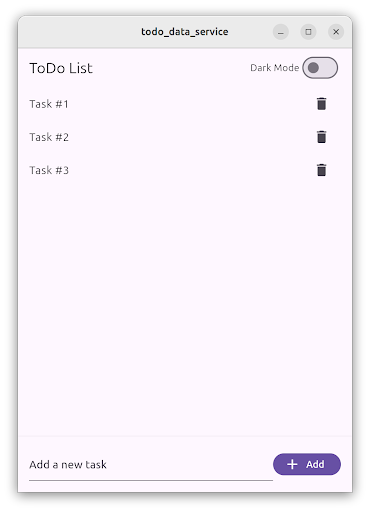 In the `AppBar`,
a `Switch` allows users to change between dark and light theme modes.
This setting is applied immediately and it’s stored in the device
using a key-value data storage service.
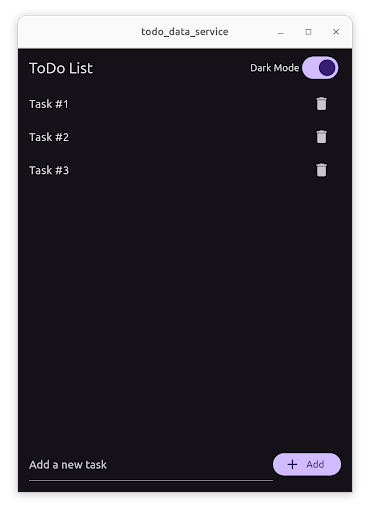
The setting is restored when the user starts the application again.
In the `AppBar`,
a `Switch` allows users to change between dark and light theme modes.
This setting is applied immediately and it’s stored in the device
using a key-value data storage service.
The setting is restored when the user starts the application again.
 :::note
The full, runnable source-code for this example is
available in [`/examples/app-architecture/todo_data_service/`][].
:::
## Storing theme selection key-value data
This functionality follows the recommended Flutter architecture design pattern,
with a presentation and a data layer.
- The presentation layer contains the `ThemeSwitch` widget
and the `ThemeSwitchViewModel`.
- The data layer contains the `ThemeRepository`
and the `SharedPreferencesService`.
### Theme selection presentation layer
The `ThemeSwitch` is a `StatelessWidget` that contains a `Switch` widget.
The state of the switch is represented
by the public field `isDarkMode` in the `ThemeSwitchViewModel`.
When the user taps the switch,
the code executes the command `toggle` in the view model.
```dart
class ThemeSwitch extends StatelessWidget {
const ThemeSwitch({super.key, required this.viewmodel});
final ThemeSwitchViewModel viewmodel;
@override
Widget build(BuildContext context) {
return Padding(
padding: const EdgeInsets.symmetric(horizontal: 16.0),
child: Row(
children: [
const Text('Dark Mode'),
ListenableBuilder(
listenable: viewmodel,
builder: (context, _) {
return Switch(
value: viewmodel.isDarkMode,
onChanged: (_) {
viewmodel.toggle.execute();
},
);
},
),
],
),
);
}
}
```
The `ThemeSwitchViewModel` implements a view model
as described in the MVVM pattern.
This view model contains the state of the `ThemeSwitch` widget,
represented by the boolean variable `_isDarkMode`.
The view model uses the `ThemeRepository`
to store and load the dark mode setting.
It contains two different command actions:
`load`, which loads the dark mode setting from the repository,
and `toggle`, which switches the state between dark mode and light mode.
It exposes the state through the `isDarkMode` getter.
The `_load` method implements the `load` command.
This method calls `ThemeRepository.isDarkMode`
to obtain the stored setting and calls `notifyListeners()` to refresh the UI.
The `_toggle` method implements the `toggle` command.
This method calls `ThemeRepository.setDarkMode`
to store the new dark mode setting.
As well, it changes the local state of `_isDarkMode`
then calls `notifyListeners()` to update the UI.
```dart
class ThemeSwitchViewModel extends ChangeNotifier {
ThemeSwitchViewModel(this._themeRepository) {
load = Command0(_load)..execute();
toggle = Command0(_toggle);
}
final ThemeRepository _themeRepository;
bool _isDarkMode = false;
/// If true show dark mode
bool get isDarkMode => _isDarkMode;
late final Command0 load;
late final Command0 toggle;
/// Load the current theme setting from the repository
Future> _load() async {
final result = await _themeRepository.isDarkMode();
if (result is Ok) {
_isDarkMode = result.value;
}
notifyListeners();
return result;
}
/// Toggle the theme setting
Future> _toggle() async {
_isDarkMode = !_isDarkMode;
final result = await _themeRepository.setDarkMode(_isDarkMode);
notifyListeners();
return result;
}
}
```
### Theme selection data layer
Following the architecture guidelines,
the data layer is split into two parts:
the `ThemeRepository` and the `SharedPreferencesService`.
The `ThemeRepository` is the single source of truth
for all the theming configuration settings,
and handles any possible errors coming from the service layer.
In this example,
the `ThemeRepository` also exposes the dark mode setting
through an observable `Stream`.
This allows other parts of the application
to subscribe to changes in the dark mode setting.
The `ThemeRepository` depends on `SharedPreferencesService`.
The repository obtains the stored value from the service,
and stores it when it changes.
The `setDarkMode()` method passes the new value to the `StreamController`,
so that any component listening to the `observeDarkMode` stream
```dart
class ThemeRepository {
ThemeRepository(this._service);
final _darkModeController = StreamController.broadcast();
final SharedPreferencesService _service;
/// Get if dark mode is enabled
Future> isDarkMode() async {
try {
final value = await _service.isDarkMode();
return Result.ok(value);
} on Exception catch (e) {
return Result.error(e);
}
}
/// Set dark mode
Future> setDarkMode(bool value) async {
try {
await _service.setDarkMode(value);
_darkModeController.add(value);
return Result.ok(null);
} on Exception catch (e) {
return Result.error(e);
}
}
/// Stream that emits theme config changes.
/// ViewModels should call [isDarkMode] to get the current theme setting.
Stream observeDarkMode() => _darkModeController.stream;
}
```
The `SharedPreferencesService` wraps
the `SharedPreferences` plugin functionality,
and calls to the `setBool()` and `getBool()` methods
to store the dark mode setting,
hiding this third-party dependency from the rest of the application
:::note
A third-party dependency is a way to refer to packages and plugins
developed by other programmers outside of your organization.
:::
```dart
class SharedPreferencesService {
static const String _kDarkMode = 'darkMode';
Future setDarkMode(bool value) async {
final prefs = await SharedPreferences.getInstance();
await prefs.setBool(_kDarkMode, value);
}
Future isDarkMode() async {
final prefs = await SharedPreferences.getInstance();
return prefs.getBool(_kDarkMode) ?? false;
}
}
```
## Putting it all together
In this example,
the `ThemeRepository` and `SharedPreferencesService` are created
in the `main()` method
and passed to the `MainApp` as constructor argument dependency.
```dart
void main() {
// ···
runApp(
MainApp(
themeRepository: ThemeRepository(SharedPreferencesService()),
// ···
),
);
}
```
Then, when the `ThemeSwitch` is created,
also create `ThemeSwitchViewModel`
and pass the `ThemeRepository` as dependency.
```dart
ThemeSwitch(
viewmodel: ThemeSwitchViewModel(widget.themeRepository),
),
```
The example application also includes the `MainAppViewModel` class,
which listens to changes in the `ThemeRepository`
and exposes the dark mode setting to the `MaterialApp` widget.
```dart
class MainAppViewModel extends ChangeNotifier {
MainAppViewModel(this._themeRepository) {
_subscription = _themeRepository.observeDarkMode().listen((isDarkMode) {
_isDarkMode = isDarkMode;
notifyListeners();
});
_load();
}
final ThemeRepository _themeRepository;
StreamSubscription? _subscription;
bool _isDarkMode = false;
bool get isDarkMode => _isDarkMode;
Future _load() async {
final result = await _themeRepository.isDarkMode();
if (result is Ok) {
_isDarkMode = result.value;
}
notifyListeners();
}
@override
void dispose() {
_subscription?.cancel();
super.dispose();
}
}
```
```dart
ListenableBuilder(
listenable: _viewModel,
builder: (context, child) {
return MaterialApp(
theme: _viewModel.isDarkMode ? ThemeData.dark() : ThemeData.light(),
home: child,
);
},
child: //...
)
```
[Flutter architecture design]: /app-architecture
[Store key-value data on disk]: /cookbook/persistence/key-value
[Persistent Storage Architecture: SQL]: /app-architecture/design-patterns/sql
[`/examples/app-architecture/todo_data_service/`]: https://github.com/flutter/website/tree/main/examples/app-architecture/todo_data_service/
:::note
The full, runnable source-code for this example is
available in [`/examples/app-architecture/todo_data_service/`][].
:::
## Storing theme selection key-value data
This functionality follows the recommended Flutter architecture design pattern,
with a presentation and a data layer.
- The presentation layer contains the `ThemeSwitch` widget
and the `ThemeSwitchViewModel`.
- The data layer contains the `ThemeRepository`
and the `SharedPreferencesService`.
### Theme selection presentation layer
The `ThemeSwitch` is a `StatelessWidget` that contains a `Switch` widget.
The state of the switch is represented
by the public field `isDarkMode` in the `ThemeSwitchViewModel`.
When the user taps the switch,
the code executes the command `toggle` in the view model.
```dart
class ThemeSwitch extends StatelessWidget {
const ThemeSwitch({super.key, required this.viewmodel});
final ThemeSwitchViewModel viewmodel;
@override
Widget build(BuildContext context) {
return Padding(
padding: const EdgeInsets.symmetric(horizontal: 16.0),
child: Row(
children: [
const Text('Dark Mode'),
ListenableBuilder(
listenable: viewmodel,
builder: (context, _) {
return Switch(
value: viewmodel.isDarkMode,
onChanged: (_) {
viewmodel.toggle.execute();
},
);
},
),
],
),
);
}
}
```
The `ThemeSwitchViewModel` implements a view model
as described in the MVVM pattern.
This view model contains the state of the `ThemeSwitch` widget,
represented by the boolean variable `_isDarkMode`.
The view model uses the `ThemeRepository`
to store and load the dark mode setting.
It contains two different command actions:
`load`, which loads the dark mode setting from the repository,
and `toggle`, which switches the state between dark mode and light mode.
It exposes the state through the `isDarkMode` getter.
The `_load` method implements the `load` command.
This method calls `ThemeRepository.isDarkMode`
to obtain the stored setting and calls `notifyListeners()` to refresh the UI.
The `_toggle` method implements the `toggle` command.
This method calls `ThemeRepository.setDarkMode`
to store the new dark mode setting.
As well, it changes the local state of `_isDarkMode`
then calls `notifyListeners()` to update the UI.
```dart
class ThemeSwitchViewModel extends ChangeNotifier {
ThemeSwitchViewModel(this._themeRepository) {
load = Command0(_load)..execute();
toggle = Command0(_toggle);
}
final ThemeRepository _themeRepository;
bool _isDarkMode = false;
/// If true show dark mode
bool get isDarkMode => _isDarkMode;
late final Command0 load;
late final Command0 toggle;
/// Load the current theme setting from the repository
Future> _load() async {
final result = await _themeRepository.isDarkMode();
if (result is Ok) {
_isDarkMode = result.value;
}
notifyListeners();
return result;
}
/// Toggle the theme setting
Future> _toggle() async {
_isDarkMode = !_isDarkMode;
final result = await _themeRepository.setDarkMode(_isDarkMode);
notifyListeners();
return result;
}
}
```
### Theme selection data layer
Following the architecture guidelines,
the data layer is split into two parts:
the `ThemeRepository` and the `SharedPreferencesService`.
The `ThemeRepository` is the single source of truth
for all the theming configuration settings,
and handles any possible errors coming from the service layer.
In this example,
the `ThemeRepository` also exposes the dark mode setting
through an observable `Stream`.
This allows other parts of the application
to subscribe to changes in the dark mode setting.
The `ThemeRepository` depends on `SharedPreferencesService`.
The repository obtains the stored value from the service,
and stores it when it changes.
The `setDarkMode()` method passes the new value to the `StreamController`,
so that any component listening to the `observeDarkMode` stream
```dart
class ThemeRepository {
ThemeRepository(this._service);
final _darkModeController = StreamController.broadcast();
final SharedPreferencesService _service;
/// Get if dark mode is enabled
Future> isDarkMode() async {
try {
final value = await _service.isDarkMode();
return Result.ok(value);
} on Exception catch (e) {
return Result.error(e);
}
}
/// Set dark mode
Future> setDarkMode(bool value) async {
try {
await _service.setDarkMode(value);
_darkModeController.add(value);
return Result.ok(null);
} on Exception catch (e) {
return Result.error(e);
}
}
/// Stream that emits theme config changes.
/// ViewModels should call [isDarkMode] to get the current theme setting.
Stream observeDarkMode() => _darkModeController.stream;
}
```
The `SharedPreferencesService` wraps
the `SharedPreferences` plugin functionality,
and calls to the `setBool()` and `getBool()` methods
to store the dark mode setting,
hiding this third-party dependency from the rest of the application
:::note
A third-party dependency is a way to refer to packages and plugins
developed by other programmers outside of your organization.
:::
```dart
class SharedPreferencesService {
static const String _kDarkMode = 'darkMode';
Future setDarkMode(bool value) async {
final prefs = await SharedPreferences.getInstance();
await prefs.setBool(_kDarkMode, value);
}
Future isDarkMode() async {
final prefs = await SharedPreferences.getInstance();
return prefs.getBool(_kDarkMode) ?? false;
}
}
```
## Putting it all together
In this example,
the `ThemeRepository` and `SharedPreferencesService` are created
in the `main()` method
and passed to the `MainApp` as constructor argument dependency.
```dart
void main() {
// ···
runApp(
MainApp(
themeRepository: ThemeRepository(SharedPreferencesService()),
// ···
),
);
}
```
Then, when the `ThemeSwitch` is created,
also create `ThemeSwitchViewModel`
and pass the `ThemeRepository` as dependency.
```dart
ThemeSwitch(
viewmodel: ThemeSwitchViewModel(widget.themeRepository),
),
```
The example application also includes the `MainAppViewModel` class,
which listens to changes in the `ThemeRepository`
and exposes the dark mode setting to the `MaterialApp` widget.
```dart
class MainAppViewModel extends ChangeNotifier {
MainAppViewModel(this._themeRepository) {
_subscription = _themeRepository.observeDarkMode().listen((isDarkMode) {
_isDarkMode = isDarkMode;
notifyListeners();
});
_load();
}
final ThemeRepository _themeRepository;
StreamSubscription? _subscription;
bool _isDarkMode = false;
bool get isDarkMode => _isDarkMode;
Future _load() async {
final result = await _themeRepository.isDarkMode();
if (result is Ok) {
_isDarkMode = result.value;
}
notifyListeners();
}
@override
void dispose() {
_subscription?.cancel();
super.dispose();
}
}
```
```dart
ListenableBuilder(
listenable: _viewModel,
builder: (context, child) {
return MaterialApp(
theme: _viewModel.isDarkMode ? ThemeData.dark() : ThemeData.light(),
home: child,
);
},
child: //...
)
```
[Flutter architecture design]: /app-architecture
[Store key-value data on disk]: /cookbook/persistence/key-value
[Persistent Storage Architecture: SQL]: /app-architecture/design-patterns/sql
[`/examples/app-architecture/todo_data_service/`]: https://github.com/flutter/website/tree/main/examples/app-architecture/todo_data_service/